Home › Audio / Visual / Telematics › NAVIGATION / MULTI INFO DISPLAY › NAVIGATION SYSTEM › from 2018.08
RM2660E _56 Audio / Visual / Telematics _052829 NAVIGATION / MULTI INFO DISPLAY _0255494 NAVIGATION SYSTEM J

NAVIGATION / MULTI INFO DISPLAY  NAVIGATION SYSTEM  Display Signal Circuit between Multi-display and Radio Receiver  


DESCRIPTION

The display image signal from the multi-media module receiver assembly is sent to the multi-display assembly using a GVIF cable.

WIRING DIAGRAM
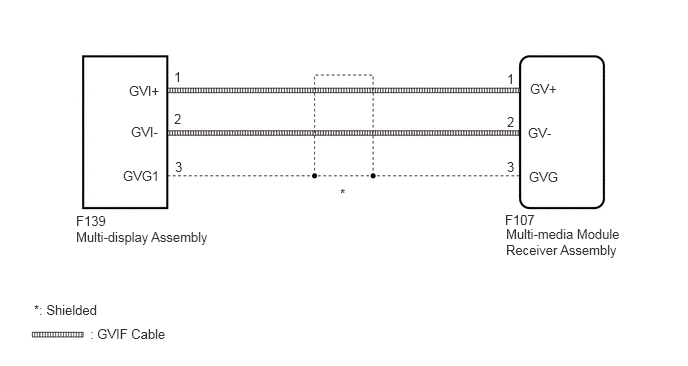
E306678E64
1.344,0.865 1.813,1.073 0.469,0.208 10 false GVI+ 1.365,1.292 1.792,1.479 0.427,0.188 10 false GVI- 1.281,1.75 1.74,2.042 0.458,0.292 10 false GVG1 0.792,2.219 1.198,2.375 0.406,0.156 10 false F139 0.792,2.385 2.302,2.604 1.51,0.219 10 false Multi-display Assembly 1.813,0.719 2.219,0.875 0.406,0.156 10 false 1 1.813,1.156 2.219,1.313 0.406,0.156 10 false 2 1.823,1.656 2.229,1.813 0.406,0.156 10 false 3 0.354,3.146 1.854,3.313 1.5,0.167 10 false *: Shielded 0.938,3.396 2.438,3.563 1.5,0.167 10 false : GVIF Cable 3.542,1.938 3.76,2.094 0.219,0.156 10 false * 5.281,0.74 5.688,0.896 0.406,0.156 10 false 1 5.281,1.188 5.688,1.344 0.406,0.156 10 false 2 5.281,1.656 5.688,1.813 0.406,0.156 10 false 3 5.521,0.844 5.927,1 0.406,0.156 10 false GV+ 5.5,1.302 5.906,1.458 0.406,0.156 10 false GV- 5.51,1.76 5.917,1.917 0.406,0.156 10 false GVG 5.26,2.208 5.667,2.365 0.406,0.156 10 false F107 5.271,2.354 6.781,2.75 1.51,0.396 10 false Multi-media Module Receiver Assembly

PROCEDURE

1.CHECK GVIF CABLE CONNECTOR
a.

Check if the GVIF cable connector between the multi-media module receiver assembly and the multi-display assembly has any connection problems.


b.

Check that the screen display is normal.

OK:

Screen display is normal.


OK

NG

2.CHECK MULTI-DISPLAY ASSEMBLY
a.

Replace the multi-display assembly with a new or normally functioning one (See page Audio / Visual / Telematics>NAVIGATION / MULTI INFO DISPLAY>MULTI-DISPLAY (w/ Navigation System)>REMOVAL).


b.

Check that the screen display is normal.

OK:

Screen display is normal.


OK

END (MULTI-DISPLAY ASSEMBLY IS DEFECTIVE)

NG

PROCEED TO NEXT SUSPECTED AREA SHOWN IN PROBLEM SYMPTOMS TABLE