AUDIO / VIDEO REAR SEAT ENTERTAINMENT SYSTEM SYSTEM DESCRIPTION
OUTLINE
The Rear Seat Entertainment (RSE) system has the following modes: A mode that allows the front and rear seat occupants to select same audio-visual mode, and a mode that allows the front and rear seat occupants to select different audio-visual modes at the same time (independent mode).
The rear seat occupants can control the audio and visual modes with the switches of television display assembly, and listen to audio by using vehicle speakers or wired headphones.
The television display assembly receives image and sound signals from the multi-display controller.
A television display assembly is installed to the back of each front seat.
The rear seat occupants can watch video from a connected external device.
MOST communication is used between the radio receiver assembly and the multi-display controller. AVC-LAN communication is used between the television display assembly and multi-display controller.
Occupants in the front seats, rear left seat and rear right seat can enjoy different content at the same time. However, this is possible for the rear left and rear right seat only when VIDEO is selected for either the left or right seat and another source is selected for the other seat.
The rear seat "DLNA" function is directly connected to the multi-display controller via "Wi-Fi" and can display content data stored on a smartphone or tablet on the television display assembly.
The rear seat "Miracast" function is directly connected to the multi-display controller via "Wi-Fi" and can display a smartphone or tablet on the television display assembly.
- HINT:
-
·
"Miracast" is a registered trademark of the Wi-Fi Alliance.
·"Wi-Fi" is a registered trademark of the Wi-Fi Alliance.
·"DLNA" is a registered trademark of the Digital Living Network Alliance.
·"Bluetooth" is a registered trademark of the Bluetooth SIG, Inc.
·"DLNA", "Miracast", "Bluetooth" and other "Wi-Fi" use the same 2.4 GHz band radio waves. As a result, if Bluetooth audio and "Miracast" are connected at the same time delays in operation speed and connection drops, etc., may occur.
FUNCTION OF MAIN COMPONENTS
| Component | Function |
|---|---|
| Television display assembly |
·
Displays video images in accordance with video signals from the multi-display controller.
·
Displays the audio and visual control screen.
·
Displays the adjustment screen.
·
Displays the diagnosis screen. The diagnosis screen appears when diagnosis mode is started on the multi-display.
·
Even if the ignition switch is turned from ON to off to ON, the display condition will continue (image adjustments will be maintained and sources will continue playing).
·
Outputs various control signals of the rear seat entertainment system to the multi-display controller. |
| Multi-display Controller |
·
Processes audio and video signals from the HDMI terminal and audio signals from the radio receiver assembly, and outputs them to the television display assemblies and headphone terminals.
·
Controls the distribution of the audio and visual content to the rear left and rear right television display assembly.
·
Outputs audio signals for the video to the front seats. |
| Headphone Terminal |
·
Outputs audio signals to wired headphones that are connected.
·
Adjusts the volume of wired headphones in accordance with volume control. |
| HDMI terminal (harness and connector) | Allows an external device to be connected. |
| Radio receiver assembly | Outputs audio and video signals to the multi-display controller. |
COMMUNICATION SYSTEM
MOST NETWORK OUTLINE
Rear seat entertainment system components communicate with each other via the MOST communication line.
- HINT:
-
·
w/ Navigation System:
Click hereAudio / Visual / Telematics>NAVIGATION / MULTI INFO DISPLAY>NAVIGATION SYSTEM>SYSTEM DESCRIPTION
·
AVC-LAN OUTLINE
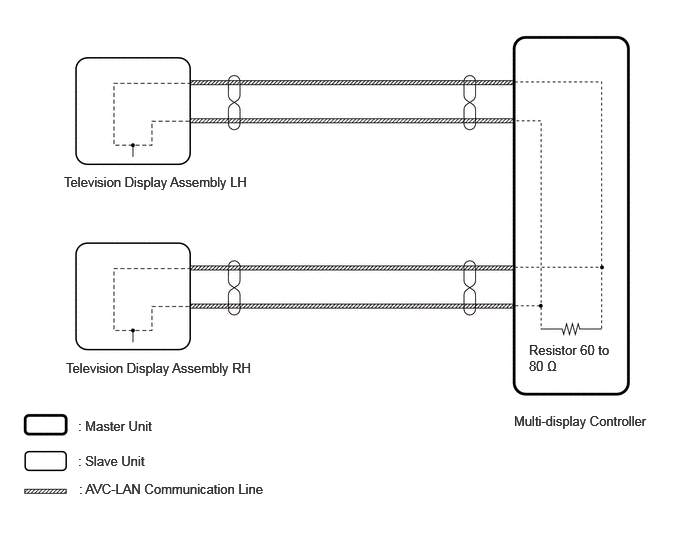
Components of the rear seat entertainment system communicate with each other via the AVC-LAN.
The AVC-LAN uses a twisted pair of wires for its communication lines.
- HINT:
-
If a short or open circuit occurs in the AVC-LAN circuit, communication is interrupted and system will not operate normally.
FILE INFORMATION OUTLINE
w/ Navigation System
Click hereAudio / Visual / Telematics>NAVIGATION / MULTI INFO DISPLAY>NAVIGATION SYSTEM>SYSTEM DESCRIPTION
HDMI TERMINAL OUTLINE
The terms HDMI, High-Definition Multimedia Interface and HDMI logo are a trademark or registered trademarks of HDMI Licensing Administrator, Inc. in the U.S. and other countries.

With a compatible portable device connected using the HDMI cable, the video files can be played on the television display assembly.
HDMI compatible format
Compatible video signal: 480p, 576p, 720p, VGA
Compatible sound signal: LPCM 2ch
"Miracast" FUNCTION OUTLINE
About "Miracast"
"Miracast" is a trademark owned by Wi-Fi Alliance, a non-profit industry association.
"Miracast" uses the "Wi-Fi" connection (P2P function) to display smartphone and tablet screens on the multi-display and allows for audio on the smartphone, etc., to be streamed through vehicle speakers.
Supported devices
| Supported mobile devices | Android smartphones or tablets certified as "Miracast" compatible devices from the Wi-Fi alliance. |
- HINT:
-
·
Depending on differences between models or software versions etc., some models might be incompatible with this system.
·Refer to the owner's manual included with the device for information about "Miracast" support.
DIAGNOSIS FUNCTION
When the diagnosis screen is displayed on the navigation system, the television display assemblies will display "REAR Check".
Click hereAudio / Visual / Telematics>AUDIO / VIDEO>REAR SEAT ENTERTAINMENT SYSTEM>OPERATION CHECK