RM38G0E _57 Power Source / Network _100626 NETWORKING _0467815 NETWORK GATEWAY ECU(for LHD) A
NETWORKING NETWORK GATEWAY ECU(for LHD) INSTALLATION
CAUTION / NOTICE / HINT
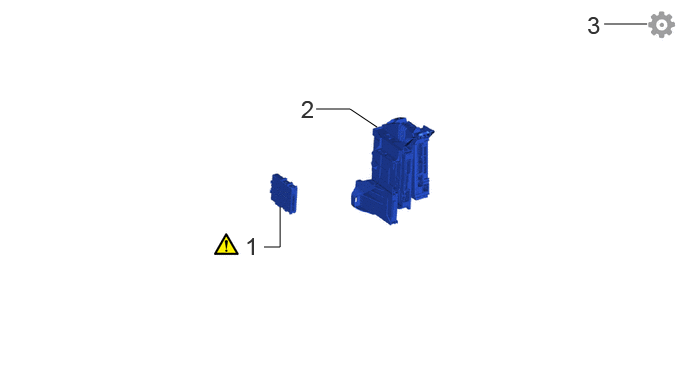
COMPONENTS (INSTALLATION)
2.75,2.573 2.917,2.573 2.917,2.573 2.917,2.156 false 3.292,1.135 3.646,1.135 3.646,1.135 3.927,1.323 false 6.292,0.25 6.74,0.25 false 2.552,2.417 2.833,2.771 0.281,0.354 18 false 1 3.135,0.99 3.417,1.344 0.281,0.354 18 false 2 6.115,0.115 6.396,0.469 0.281,0.354 18 false 3
| Procedure | Part Name Code |

|

|

|
|
|---|---|---|---|---|---|
| 1 | NETWORK GATEWAY ECU | 89111 | ( ) |
- | - |
| 2 | ECU INTEGRATION BOX RH | 82877 | - | - | - |
| 3 | UPDATE ECU SECURITY KEY | - | - | - | () |
CAUTION / NOTICE / HINT
- HINT:
-
A bolt without a torque specification is shown in the standard bolt chart.
-
Click hereGeneral>SPECIFICATIONS>STANDARD BOLT>SPECIFIED TORQUE FOR STANDARD BOLTS
PROCEDURE

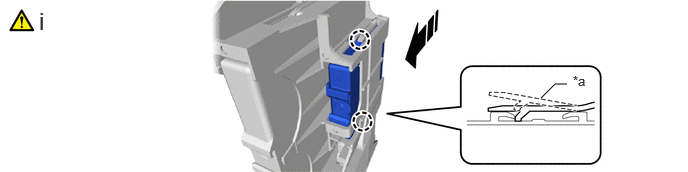
 89111 1.INSTALL NETWORK GATEWAY ECU
a.
5.635,1.021 5.781,0.875 5.781,0.875 5.906,0.875 false 5.969,0.76 6.281,0.917 0.313,0.156 10 false *a 0.406,0.073 0.719,0.448 0.313,0.375 18 false i
| *a | Retainer | - | - |

|
Install in this Direction | - | - |
i.
Attach the claw and install the network gateway ECU.
- NOTICE:
-
Be sure that the ECU integration box RH is over the retainer of the network gateway ECU as shown in the illustration.
82877 2.INSTALL ECU INTEGRATION BOX RH
3.UPDATE ECU SECURITY KEY