RM38G0E _59 Vehicle Exterior _100649 LIGHTING (EXT) _0468051 REAR LIGHT ASSEMBLY A
LIGHTING (EXT) REAR LIGHT ASSEMBLY REMOVAL
CAUTION / NOTICE / HINT
COMPONENTS (REMOVAL)
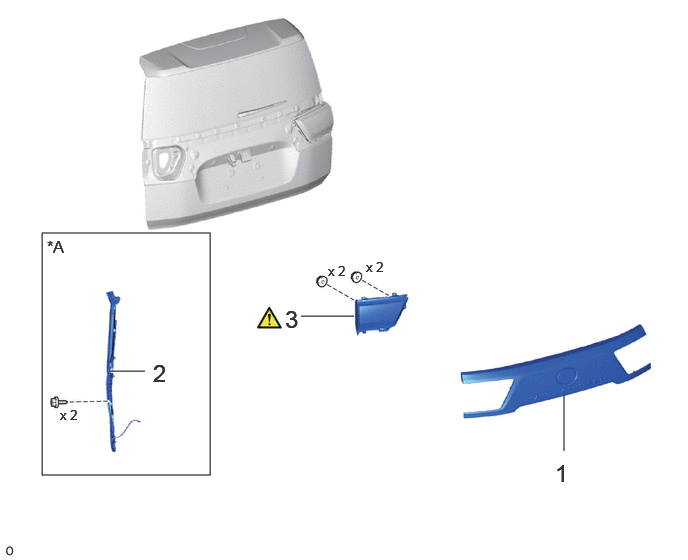
0.438,2.427 2.188,4.948 1.75,2.521 1.156,3.865 1.51,3.865 false 3.135,3.292 3.688,3.292 false 5.875,4.115 5.875,4.698 false 3.813,2.698 4.271,2.896 0.458,0.198 10 false x 2 3.417,2.74 3.875,2.938 0.458,0.198 10 false x 2 5.781,4.781 6.063,5.135 0.281,0.354 18 false 1 1.594,3.74 1.875,4.094 0.281,0.354 18 false 2 2.969,3.177 3.25,3.531 0.281,0.354 18 false 3 0.49,2.469 0.865,2.708 0.375,0.24 12 false *A 0.625,4.24 1.083,4.438 0.458,0.198 10 false x 2
| Procedure | Part Name Code |

|

|

|
|
|---|---|---|---|---|---|
| 1 | BACK DOOR OUTSIDE GARNISH SUB-ASSEMBLY | 76801 | - | - | - |
| 2 | POWER BACK DOOR SENSOR ASSEMBLY LH | 84280D | - | - | - |
| 3 | REAR LIGHT ASSEMBLY LH | 81590A | ( ) |
- | - |
| *A | w/ Power Back Door | - | - |
CAUTION / NOTICE / HINT
- HINT:
-
·
Use the same procedure for the RH and LH sides.
·The procedure described below is for the LH side.
PROCEDURE

 76801 1.REMOVE BACK DOOR OUTSIDE GARNISH SUB-ASSEMBLY
84280D 2.REMOVE POWER BACK DOOR SENSOR ASSEMBLY LH (w/ Power Back Door)
81590A 3.REMOVE REAR LIGHT ASSEMBLY LH
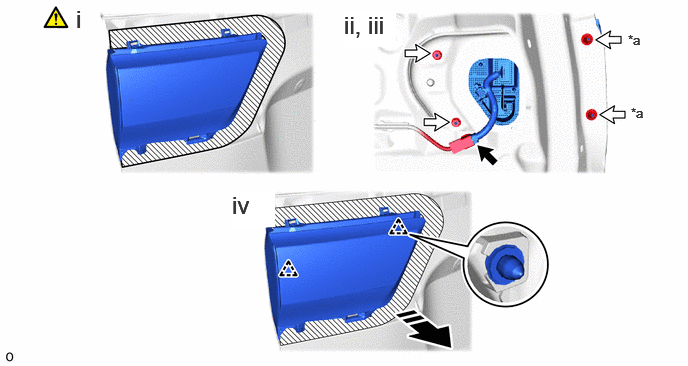
a.
0.792,0.052 1.073,0.406 0.281,0.354 18 false i 3.583,0.115 4.125,0.49 0.542,0.375 18 true ii, iii 2.417,1.99 2.865,2.365 0.448,0.375 18 true iv 6.542,0.333 6.854,0.531 0.313,0.198 10 false *a 6.573,1.094 6.885,1.292 0.313,0.198 10 false *a
| *a | Cap nut | - | - |

|
Remove in this Direction |

|
Connector |

|
Nut | - | - |
i.
Apply protective tape around the rear light assembly LH.
ii.
Disconnect the connector.
iii.
Remove the 4 nuts.
iv.
Detach the clip and pull out the rear light assembly LH as shown in the illustration.