AUDIO / VIDEO AUDIO AND VISUAL SYSTEM(for Radio and Display Type, for 12.3 Inch Display) Touch Panel Switch does not Function
CAUTION / NOTICE / HINT
- NOTICE:
-
Depending on the parts that are replaced during vehicle inspection or maintenance, performing initialization, registration or calibration may be needed. Refer to Precaution for audio and visual system.
PROCEDURE
Check if the Toyota multi operation touch system is malfunctioning.
- OK:
-
No malfunctions are present in the Toyota multi operation touch system.
- Result:
-
Proceed to OK NG
OK
NG
Check if there is any foreign matter caught between the display and exterior frame of the multi-display assembly.
- OK:
-
No foreign matter is caught between the display and exterior frame of the multi-display assembly.
- HINT:
-
·
If there is foreign matter between the display and exterior frame of the multi-display assembly, the touch panel will remain pressed, preventing touch switch operation.
·If the ignition switch is turned to ACC or ON with part of your hand touching the multi-display assembly, the display may stop responding correctly.
- Result:
-
Proceed to OK NG
OK
NG
Check for foreign matter on the display.
- OK:
-
The display is clean.
- Result:
-
Proceed to OK NG
OK
NG
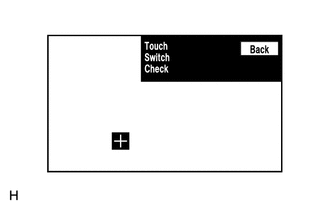
Enter the "Touch Switch Check" screen. Refer to Check Touch Switch in Operation Check.
Touch the display in the area where the switch malfunction occurs.
- OK:
-
A "+" mark appears at the touched position.
- Result:
-
Proceed to OK NG
OK
Click hereAudio / Visual / Telematics>AUDIO / VIDEO>RADIO RECEIVER (for Radio Receiver Type)>REMOVAL
NG