MAINTENANCE AIR CLEANER FILTER ELEMENT REMOVAL
CAUTION / NOTICE / HINT
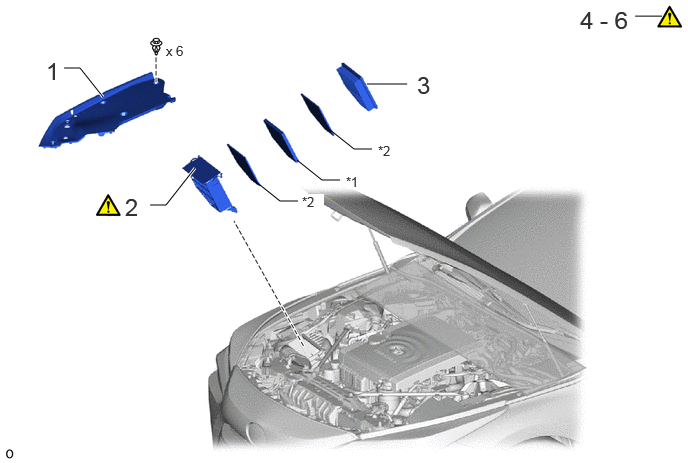
| Procedure | Part Name Code | 
|

|

|
|
|---|---|---|---|---|---|
| 1 | RADIATOR COVER PLATE | 53291B | - | - | - |
| 2 | AIR CLEANER CAP SUB-ASSEMBLY | 17705A | ( ) |
- | - |
| 3 | AIR CLEANER FILTER ELEMENT SUB-ASSEMBLY | 17801C | - | - | - |
| 4 | INSPECT AIR CLEANER FILTER ELEMENT SUB-ASSEMBLY | 17801C | ()
|
- | - |
| 5 | INSPECT AIR CLEANER FILTER | 17811 | ()
|
- | - |
| 6 | INSPECT PREFILTER | 17813B | ()
|
- | - |
| *1 | AIR CLEANER FILTER | *2 | PREFILTER |
PROCEDURE

 53291B
1.REMOVE RADIATOR COVER PLATE
17705A
2.REMOVE AIR CLEANER CAP SUB-ASSEMBLY
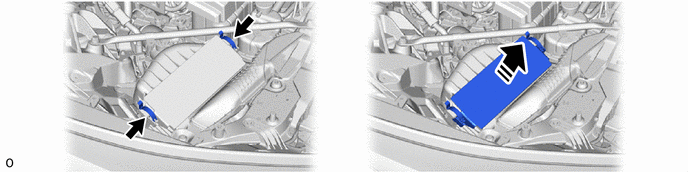
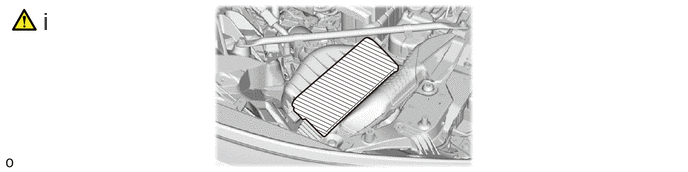
To prevent contamination by foreign matter or water droplets, cover the opening of the air cleaner case with protective tape.
17801C
3.REMOVE AIR CLEANER FILTER ELEMENT SUB-ASSEMBLY
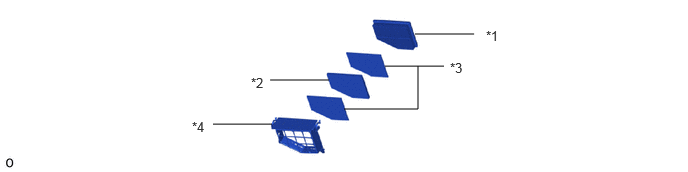
| *1 | Air Cleaner Filter Element Sub-assembly | *2 | Air Cleaner Filter |
| *3 | Prefilter | *4 | Air Cleaner Cap Sub-assembly |
17801C
4.INSPECT AIR CLEANER FILTER ELEMENT SUB-ASSEMBLY
|
|
|
Check whether the air cleaner filter element sub-assembly is dirty or clogged, and replace with a new one if dirt, deformation or foreign matter adhesion is found.
17811
5.INSPECT AIR CLEANER FILTER
|
|
|
Check whether the air cleaner filter is dirty or clogged, and replace with a new one if dirt, deformation or foreign matter adhesion is found.
17813B
6.INSPECT PREFILTER

|
|
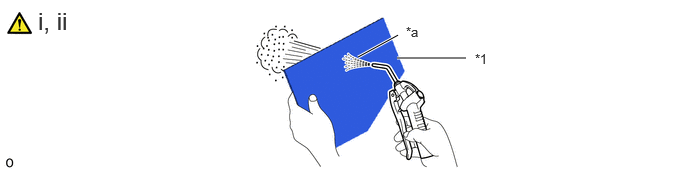
| *1 | Prefilter | - | - |
| *a | Prefilter Intake Downstream Side | - | - |
If the prefilter is dirty or has foreign matter adhered to it, clean the prefilter with compressed air.
- NOTICE:
-
When cleaning the prefilter, blow the compressed air from the intake downstream side.
If the prefilter is still extremely dirty after cleaning it, replace the prefilter with a new one.