Before registration
If replacing the tire pressure warning ECU:
- Read the registered transmitter IDs that are stored in the old ECU using the Techstream and note them down.
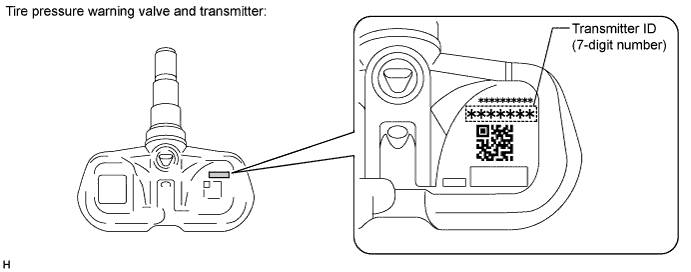
- If reading stored transmitter IDs is impossible due to malfunctions of components such as the tire pressure warning antenna and receiver, remove the tires from the wheels and check the IDs located on the tire pressure warning valves and transmitters (Click here).
- Read the registered transmitter IDs that are stored in the old ECU using the Techstream and note them down.
If replacing the tire pressure warning valve and transmitter:
- Take a note of the 7 digit number (transmitter ID) written on the tire pressure warning valve and transmitter.
- NOTICE:
- The transmitter ID is written on the tire pressure warning valve and transmitter. It will be unable to be read after installing the tire pressure warning valve and transmitter on the tire and wheel. Therefore, take a note of the transmitter ID before installing the tire pressure warning valve and transmitter.
- Take a note of the 7 digit number (transmitter ID) written on the tire pressure warning valve and transmitter.