THEFT DETERRENT / KEYLESS ENTRY SMART ENTRY AND START SYSTEM(for Start Function) Power Source Mode does not Change to ON (ACC)
DESCRIPTION
If the power switch is pressed with the electrical key transmitter sub-assembly in the cabin, the power management control ECU receives a signal and changes the power source mode.
- HINT:
-
When the cable is disconnected and reconnected to the negative (-) auxiliary battery terminal, the power source mode returns to the state it was in before the cable was disconnected.
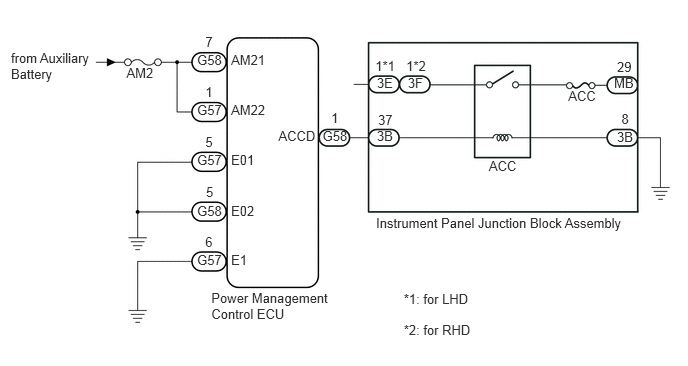
WIRING DIAGRAM
CAUTION / NOTICE / HINT
- NOTICE:
- ·
When using the intelligent tester with the power switch off, perform either of the following: 1) Turn a courtesy light switch on and off at intervals of 1.5 seconds or less until communication between the intelligent tester and vehicle begins, or 2) connect the intelligent tester to the vehicle, select the vehicle type under manual mode, and then enter the following menus:
for Power Source Control: Body / Power Source Control / DTC.
for Entry&Start: Body / Entry&Start / DTC.
·The smart entry and start system (for Start Function) uses a multiplex communication system (LIN communication system) and the CAN communication system. Inspect the communication function by following How to Proceed with Troubleshooting (See page Vehicle Interior>THEFT DETERRENT / KEYLESS ENTRY>SMART ENTRY AND START SYSTEM (for Start Function)>HOW TO PROCEED WITH TROUBLESHOOTING). Troubleshoot the smart entry and start system (for Start Function) after confirming that the communication systems are functioning properly.
·Make sure that no DTCs are output. If any DTCs are output, proceed to the Diagnostic Trouble Code Chart (See page Vehicle Interior>THEFT DETERRENT / KEYLESS ENTRY>SMART ENTRY AND START SYSTEM (for Start Function)>DIAGNOSTIC TROUBLE CODE CHART).
·If the smart entry and start system is disabled through the customize function, enable the system before performing troubleshooting (See page Vehicle Interior>THEFT DETERRENT / KEYLESS ENTRY>SMART ENTRY AND START SYSTEM (for Start Function)>CUSTOMIZE PARAMETERS).
·Before replacing the power management control ECU, refer to the Service Bulletin.
·Inspect the fuses for circuits related to this system before performing the following inspection procedure.
·After completing repairs, confirm that the problem does not occur.
- HINT:
Related Data List and Active Test Items Problem Symptom Data List Item Active Test Item Power source mode does not change to on (ACC) but does change to on (IG) Power Source Control·Power Supply Condition
·ACC Relay Monitor
-
PROCEDURE
OK
NG
OK
NG
OK
NG