PARK ASSIST / MONITORING PARKING ASSIST ECU REMOVAL
PROCEDURE

 1. PRECAUTION
- NOTICE:
-
After turning the power switch off, waiting time may be required before disconnecting the cable from the negative (-) auxiliary battery terminal. Therefore, make sure to read the disconnecting the cable from the negative (-) auxiliary battery terminal notices before proceeding with work (See page General>INTRODUCTION>REPAIR INSTRUCTION>PRECAUTION).
58410B
2.REMOVE DECK BOARD ASSEMBLY
58411A
3.REMOVE NO. 1 DECK BOARD
58412A
4.REMOVE NO. 2 DECK BOARD
64993
5.REMOVE REAR DECK FLOOR BOX
64995
6.REMOVE DECK FLOOR BOX RH
7.DISCONNECT CABLE FROM NEGATIVE AUXILIARY BATTERY TERMINAL
- NOTICE:
-
When disconnecting the cable, some systems need to be initialized after the cable is reconnected (See page General>INTRODUCTION>REPAIR INSTRUCTION>INITIALIZATION).
55607
8.REMOVE NO. 2 INSTRUMENT PANEL UNDER COVER SUB-ASSEMBLY (for LHD)
55550
9.REMOVE GLOVE COMPARTMENT DOOR ASSEMBLY (for LHD)
55480D
10.REMOVE LOWER INSTRUMENT PANEL FINISH PANEL ASSEMBLY (for RHD)
82877
11.REMOVE ECU INTEGRATION BOX RH (for LHD)
82877
12.REMOVE ECU INTEGRATION BOX RH (for RHD)
Disconnect each connector.
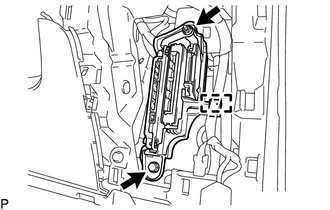
Disengage the clump.
Remove the bolt, nut and ECU integration box RH.
86792C
13.REMOVE PARKING ASSIST ECU
for LHD:
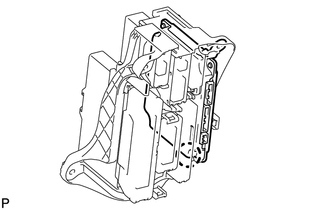
Disengage the claw and remove the parking assist ECU.
- HINT:
-
When removing the parking assist ECU, if the bracket for the driving support ECU assembly is on top of the bracket for the parking assist ECU, remove the driving support ECU assembly first (See page Engine / Hybrid System>CRUISE CONTROL>DRIVING SUPPORT ECU>REMOVAL).
for RHD:
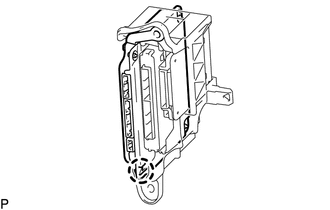
Disengage the claw and remove the parking assist ECU.
- HINT:
-
When removing the parking assist ECU, if the bracket for the driving support ECU assembly is on top of the bracket for the parking assist ECU, remove the driving support ECU assembly first (See page Engine / Hybrid System>CRUISE CONTROL>DRIVING SUPPORT ECU>REMOVAL).