VEHICLE PROXIMITY NOTIFICATION SYSTEM VEHICLE PROXIMITY NOTIFICATION SYSTEM Vehicle Approaching Speaker Switch Indicator does not Illuminate or Turn OFF
DESCRIPTION
When the vehicle approaching speaker switch is pushed when the vehicle approaching speaker system is on, the vehicle approaching speaker controller receives a signal to temporarily suspend output of the warning sound from the vehicle approaching speaker assembly, and the vehicle approaching speaker switch indicator illuminates.
WIRING DIAGRAM
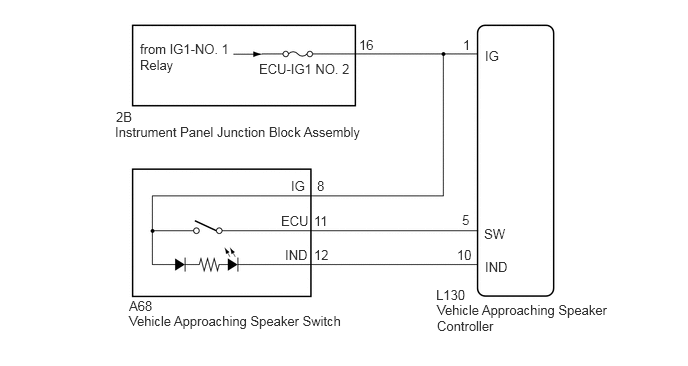
CAUTION / NOTICE / HINT
- NOTICE:
-
Inspect the fuses for circuits related to this system before performing the following inspection procedure.
PROCEDURE
Connect the GTS to the DLC3.
Turn the power switch on (IG).
Turn the GTS on.
Enter the following menus: Body Electrical / Vehicle Proximity Notification System / Data List.
Read the Data List according to the display on the GTS.
| Tester Display | Measurement Item/Range | Normal Condition | Diagnostic Note |
|---|---|---|---|
| Operation Cancel SW | Vehicle approaching speaker switch / OFF or ON | OFF: Vehicle approaching speaker switch not pressed
ON: Vehicle approaching speaker switch pressed |
- |
- Result:
Result Proceed to The GTS display changes according to the operation of the vehicle approaching speaker switch A The GTS display does not change according to the operation of the vehicle approaching speaker switch B
A
B
Remove the vehicle approaching speaker switch (See page Vehicle Exterior>VEHICLE PROXIMITY NOTIFICATION SYSTEM>VEHICLE APPROACHING SPEAKER SWITCH>REMOVAL).
Inspect the vehicle approaching speaker switch (See page Vehicle Exterior>VEHICLE PROXIMITY NOTIFICATION SYSTEM>VEHICLE APPROACHING SPEAKER SWITCH>INSPECTION).
OK
NG
(See pageVehicle Exterior>VEHICLE PROXIMITY NOTIFICATION SYSTEM>VEHICLE APPROACHING SPEAKER SWITCH>REMOVAL)
Disconnect the L130 vehicle approaching speaker controller connector.
Measure the resistance according to the value(s) in the table below.
- Standard Resistance:
Tester Connection Condition Specified Condition L130-10 (IND) - G104-12 (IND) Always Below 1 Ω L130-10 (IND) or G104-12 (IND) - Body ground Always 10 kΩ or higher
OK
(See pageVehicle Exterior>VEHICLE PROXIMITY NOTIFICATION SYSTEM>VEHICLE APPROACHING SPEAKER ECU>REMOVAL)
NG