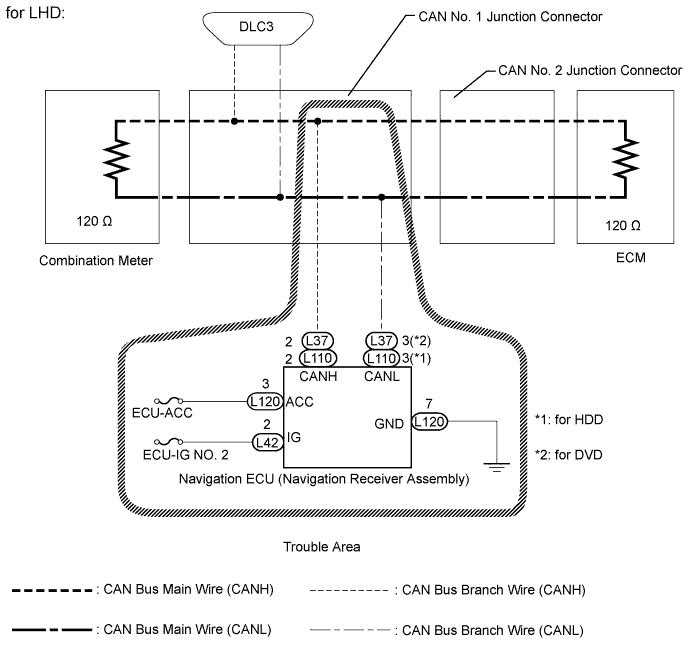
CAN COMMUNICATION SYSTEM > Navigation ECU Communication Stop Mode |
| Detection Item | Symptom | Trouble Area |
| Navigation ECU Communication Stop Mode |
|
|
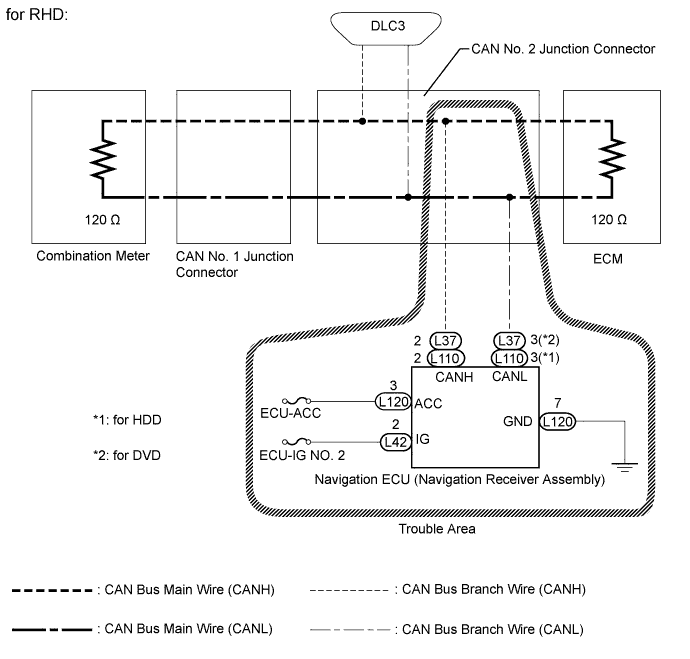
| 1.CHECK FOR OPEN IN CAN BUS WIRE (NAVIGATION ECU BRANCH WIRE) |
Turn the power switch off.
for HDD:
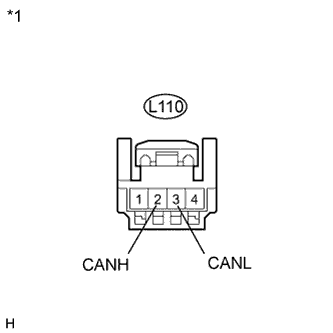 |
Disconnect the navigation ECU connector.
| *1 | Front view of wire harness connector (to Navigation ECU) |
Measure the resistance according to the value(s) in the table below.
| Tester Connection | Switch Condition | Specified Condition |
| L110-2 (CANH) - L110-3 (CANL) | Power switch off | 54 to 69 Ω |
for DVD:
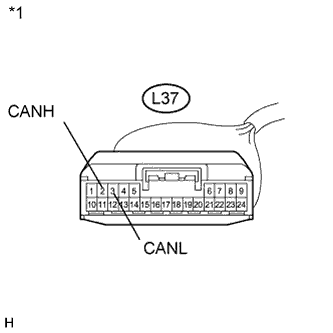 |
Disconnect the navigation ECU connector.
| *1 | Front view of wire harness connector (to Navigation ECU) |
Measure the resistance according to the value(s) in the table below.
| Tester Connection | Switch Condition | Specified Condition |
| L37-2 (CANH) - L37-3 (CANL) | Power switch off | 54 to 69 Ω |
|
| ||||
| OK | |
 |
| 2.CHECK HARNESS AND CONNECTOR (POWER SOURCE CIRCUIT) |
for HDD:
Check the navigation receiver power source circuit (Click here).
for DVD:
Check the navigation receiver power source circuit (Click here).
|
| ||||
| OK | ||
 | ||
| ||
