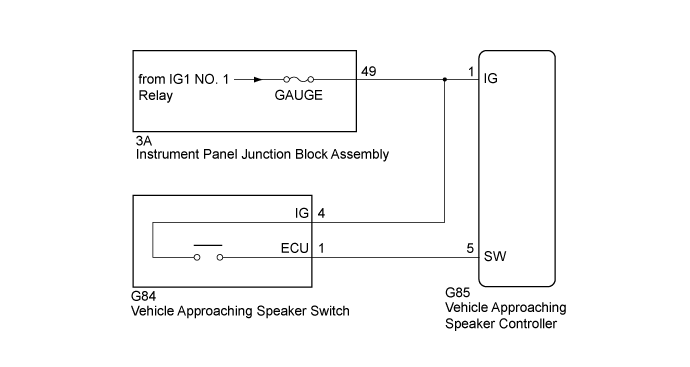
VEHICLE PROXIMITY NOTIFICATION SYSTEM > Sound does not Turn ON or OFF when the Vehicle Approaching Speaker Switch is Pressed |
| 1.READ VALUE USING GTS (Operation Cancel SW) |
Connect the GTS to the DLC3.
Turn the power switch on (IG).
Turn the GTS on.
Enter the following menus: Body Electrical / Vehicle Proximity Notification System / Data List.
Read the Data List according to the display on the GTS.
| Tester Display | Measurement Item/Range | Normal Condition | Diagnostic Note |
| Operation Cancel SW | Vehicle approaching speaker switch condition / OFF or ON | OFF: Vehicle approaching speaker switch not pressed ON: Vehicle approaching speaker switch pressed | - |
| Result | Proceed to |
| The GTS display changes according to the operation of the vehicle approaching speaker switch (Warning sound does not stop) | A |
| The GTS display changes according to the operation of the vehicle approaching speaker switch (Warning sound does not start) | B |
| The GTS display does not change according to the operation of the vehicle approaching speaker switch (The GTS display does not change (ON/OFF)) | C |
|
| ||||
|
| ||||
| A | ||
 | ||
| ||
| 2.INSPECT VEHICLE APPROACHING SPEAKER SWITCH |
Remove the vehicle approaching speaker switch (Click here).
Inspect the vehicle approaching speaker switch (Click here).
|
| ||||
| OK | |
 |
| 3.CHECK HARNESS AND CONNECTOR (VEHICLE APPROACHING SPEAKER SWITCH - IG1 NO. 1 RELAY) |
Measure the voltage according to the value(s) in the table below.
| Tester Connection | Condition | Specified Condition |
| G84-4 (IG) - Body ground | Power switch on (IG) | 11 to 14 V |
| Power switch off | Below 1 V |
|
| ||||
| OK | |
|
| 4.CHECK HARNESS AND CONNECTOR (VEHICLE APPROACHING SPEAKER CONTROLLER - VEHICLE APPROACHING SPEAKER SWITCH) |
Disconnect the G85 vehicle approaching speaker controller connector.
Measure the resistance according to the value(s) in the table below.
| Tester Connection | Condition | Specified Condition |
| G85-5 (SW) - G84-1 (ECU) | Always | Below 1 Ω |
| G85-5 (SW) or G84-1 (ECU) - Body ground | Always | 10 kΩ or higher |
|
| ||||
| OK | ||
| ||
| ||

