LIGHTING (EXT) LIGHTING SYSTEM U0242 Lost Communication With Headlamp Control Module "B"
DESCRIPTION
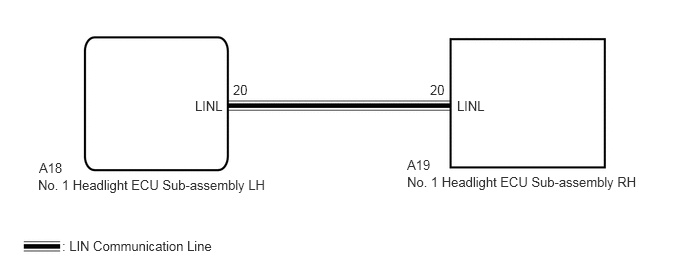
The No. 1 headlight ECU sub-assembly LH stores this DTC when the No. 1 headlight ECU sub-assembly RH detects an internal malfunction or if a communication malfunction occurs between No. 1 headlight ECU sub-assembly LH and No. 1 headlight ECU sub-assembly RH for 10 seconds or more.
| DTC No. | Detection Item | DTC Detection Condition | Trouble Area | Note |
|---|---|---|---|---|
| U0242 | Lost Communication With Headlamp Control Module "B" | Either of the following conditions is met:
·
No. 1 headlight ECU sub-assembly RH internal malfunction ·
Communication malfunction occurs between No. 1 headlight ECU sub-assembly LH and No. 1 headlight ECU sub-assembly RH for 10 seconds or more |
·
No. 1 headlight ECU sub-assembly LH ·
No. 1 headlight ECU sub-assembly RH ·
Harness or connector |
- |
WIRING DIAGRAM
CAUTION / NOTICE / HINT
- NOTICE:
-
If the No. 1 headlight ECU sub-assembly LH has been replaced, it is necessary to synchronize the vehicle information and initialize the No. 1 headlight ECU sub-assembly LH.
-
Click hereVehicle Exterior>LIGHTING (EXT)>LIGHTING SYSTEM>INITIALIZATION
PROCEDURE
Clear the DTCs.
Click hereVehicle Exterior>LIGHTING (EXT)>LIGHTING SYSTEM>DTC CHECK / CLEAR
- Body Electrical > HL AutoLeveling > Clear DTCs
- 50002 361
- Result:
Proceed to NEXT
NEXT
Turn the power switch on (IG).
Check for DTCs.
Click hereVehicle Exterior>LIGHTING (EXT)>LIGHTING SYSTEM>DTC CHECK / CLEAR
- Body Electrical > HL AutoLeveling > Trouble Codes
- 50001 361
- OK:
DTC U0242 is not output.
- Result:
Proceed to OK NG
OK
Click hereGeneral>INTRODUCTION>HOW TO TROUBLESHOOT ECU CONTROLLED SYSTEMS>HOW TO PROCEED WITH TROUBLESHOOTING
NG
Disconnect the A18 No. 1 headlight ECU sub-assembly LH connector.
Disconnect the A19 No. 1 headlight ECU sub-assembly RH connector.
Measure the resistance according to the value(s) in the table below.
- Standard Resistance:
Tester Connection Condition Specified Condition A18-20 (LINL) - A19-20 (LINL) Always Below 1 Ω A18-20 (LINL) or A19-20 (LINL) - Body ground Always 10 kΩ or higher
- Result:
Proceed to OK NG
OK
NG
Replace the headlight ECU sub-assembly RH with a new or known good one.
Click hereVehicle Exterior>LIGHTING (EXT)>HEADLIGHT ECU>REMOVAL
- Result:
Proceed to NEXT
NEXT
Clear the DTCs.
Click hereVehicle Exterior>LIGHTING (EXT)>LIGHTING SYSTEM>DTC CHECK / CLEAR
- Body Electrical > HL AutoLeveling > Clear DTCs
- 50002 361
- Result:
Proceed to NEXT
NEXT
Turn the power switch on (IG).
Check for DTCs.
Click hereVehicle Exterior>LIGHTING (EXT)>LIGHTING SYSTEM>DTC CHECK / CLEAR
- Body Electrical > HL AutoLeveling > Trouble Codes
- 50001 361
- OK:
DTC U0242 is not output.
- Result:
Proceed to OK NG
OK
NG