Voice is not Recognized
Circuit diagnosis · Vehicles built from Nov 2005
INSPECTION PROCEDURE
| 1. CHECK NAVIGATION SETTING |

Enter the "Menu" screen by pressing the "MENU" switch.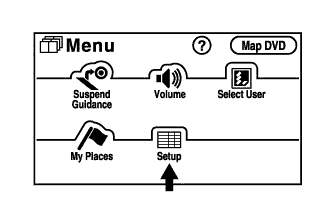

Select "Setup".
Check that "Voice Recognition Guidance" is not OFF.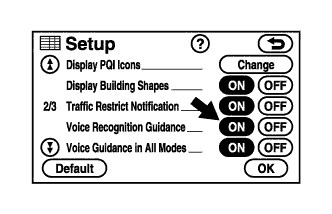
- OK:
- "Voice Recognition Guidance" is not OFF.
|
|
||||

| OK | |
 |
| 2. CHECK MAP DISC |
Check that the map disc is not deformed or cracked.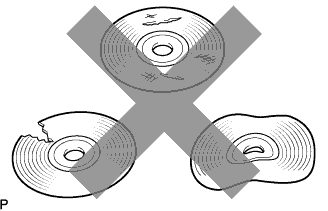
- OK:
- No deformations or cracks on map disc.
|
|
||||
| OK | |
|
| 3. CHECK MAP DISC |
Check for dirt on the map disc surface.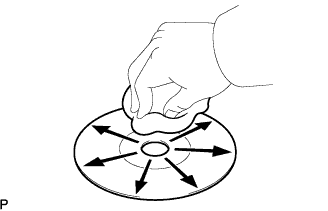
- OK:
- No dirt is on the map disc surface.
- NOTICE:
- Do not use conventional record cleaner or anti-static preservative.
- HINT:
- If the disc is dirty, clean the disc by wiping the disc's surface radially with a soft cloth.
|
|
||||
| OK | |
|
| 4. CHECK MICROPHONE (NAVIGATION CHECK MODE) |
Enter the "Microphone and Voice Recognition Check" mode (Click here).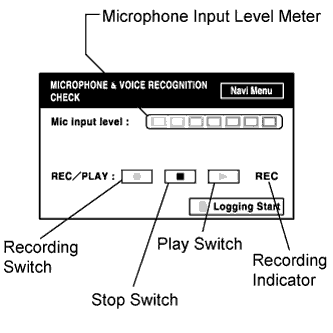
When audio is input to the microphone, check if the microphone input level meter varies accordingly.
Push the recording switch and, while sitting in the driver seat, speak for approximately 5 seconds. When recording, check that the recording indicator illuminates.
Check that the recorded audio can be played back normally.
- OK:
- All check results are normal.
|
|
||||
| OK | ||
 |
||
| ||