TEST MODE PROCEDURE
Troubleshooting · Vehicles built Nov 2005 – Jul 2007
Versions by build date: Nov 2005 – Jul 2007 from Aug 2007
- HINT:
- By switching the skid control ECU from normal mode to test mode, abnormality detection sensitivity is enhanced and troubleshooting can be conducted efficiently.
- Perform a sensor check in the test mode after the speed sensor or sensor rotor has been repaired or replaced.
- If the ignition switch is turned from on (IG) to on (ACC) or off during test mode, DTCs related to the signal check function will be erased.
- During test mode, the skid control ECU stores all DTCs related to the signal check function, and the DTCs are erased if normality is confirmed. Any remaining DTCs are those indicating abnormalities that were found.
- By switching the skid control ECU from normal mode to test mode, abnormality detection sensitivity is enhanced and troubleshooting can be conducted efficiently.
| CHECK SENSOR SIGNAL BY TEST MODE (When Using Intelligent Tester) |
Procedures for test mode:
Turn the ignition switch off.
Check that the steering wheel is in the straight-ahead position.
A/T:
Check that the shift lever is in the P position and apply the parking brake.M/T:
Check that the shift lever is in neutral and apply the parking brake.
Connect the intelligent tester to the DLC3.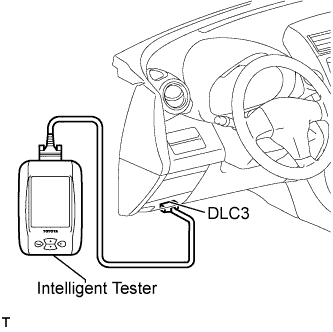

Turn the ignition switch on (IG).
Turn the tester on.
Set the intelligent tester to Test Mode (select "Signal Check").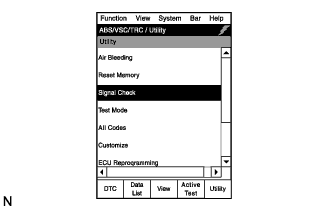
- HINT:
- Refer to the intelligent tester operator's manual for further details.
Check that the ABS warning light blinks as shown in the illustration.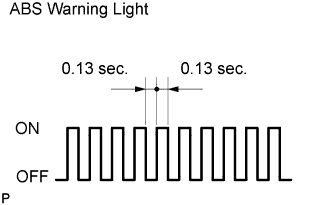
- HINT:
- If the ABS warning light does not blink, perform the relevant troubleshooting procedures. The relevant troubleshooting procedures are instructed in the sections listed in the table below.
Section Title
See procedure
ABS Warning Light does not Come ON
Click here
TS and CG Terminal Circuit
Click here
Start the engine.
Check the deceleration sensor.
Check that the ABS warning light is blinking as shown in the illustration.
Keep the vehicle stationary on a level surface for 1 second or more.
- HINT:
- When the sensor is normal, the test mode is operating, and the conditions are met, the warning light goes off normally without changing.
Check the speed sensor.
Check that the ABS warning light is blinking as shown in the illustration.
Check the speed sensor signal.
- Drive the vehicle straight forward at a speed of 45 km/h (28 mph) or more for several seconds.
- Check that the ABS warning light goes off.
- HINT:
- The speed sensor check may not be completed if the sensor check is started with the steering wheel turned or one or more wheels spinning.
- If the speed sensor check is commenced while the steering wheel is turned, the ABS warning light may come on after the low speed check is finished.
- The ABS warning light comes on immediately when an abnormality is detected.
- When the speed sensor signal is normal, the ABS warning light goes off while driving at 45 km/h (28 mph) or more and blinks in the test mode pattern while stationary.
- Do not drive the vehicle at a speed of 80 km/h (50 mph) or more after the ABS warning light turns off, because test mode DTCs are set again when the vehicle speed exceeds 80 km/h (50 mph).
- The speed sensor check may not be completed if the sensor check is started with the steering wheel turned or one or more wheels spinning.
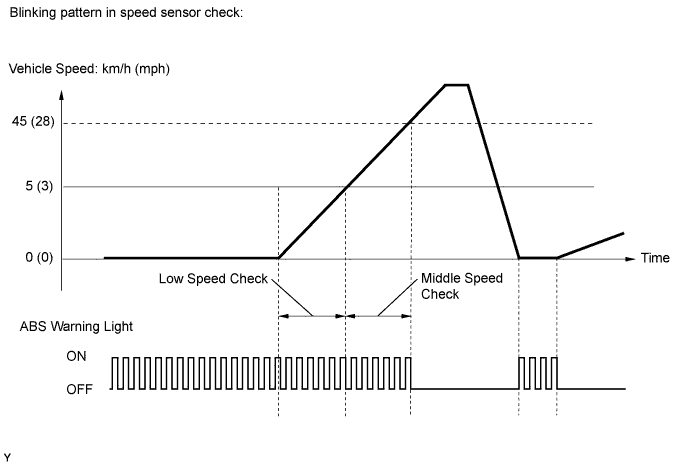
- Stop the vehicle.
- Drive the vehicle straight forward at a speed of 45 km/h (28 mph) or more for several seconds.
End of the sensor check.
When the sensor check is successfully completed, the ABS warning light blinks in the test mode pattern when the vehicle is stopped, and goes off when the vehicle is driven.
- NOTICE:
- If the sensor check is not completed, the ABS warning light blinks even while the vehicle is driven and the ABS does not operate.
Read the DTCs of the signal check function.
Read the DTC(s) by following the instructions on the tester screen.
- HINT:
- See the list of DTCs (refer to the "DTC OF TEST MODE FUNCTION (SIGNAL CHECK)" table).
| CHECK SENSOR SIGNAL BY TEST MODE (When not Using Intelligent Tester) |
Procedures for test mode:
Turn the ignition switch off.
Using SST, connect terminals 12 (TS) and 4 (CG) of the DLC3.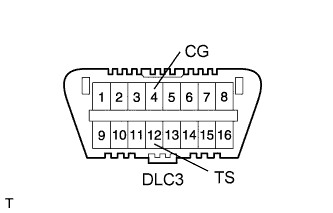
- SST
- 09843-18040
Check that the steering wheel is in the straight-ahead position.
A/T:
Check that the shift lever is in the P position and apply the parking brake.M/T:
Check that the shift lever is in neutral and apply the parking brake.Turn the ignition switch on (IG).
Check that the ABS warning light blinks as shown in the illustration.
- HINT:
- If the ABS warning light does not blink, perform the relevant troubleshooting procedures. The relevant troubleshooting procedures are instructed in the sections listed in the table below.
Section Title
See procedure
ABS Warning Light does not Come ON
Click here
TS and CG Terminal Circuit
Click here
Start the engine.
Check the deceleration sensor.
Check that the ABS warning light is blinking as shown in the illustration.
Keep the vehicle stationary on a level surface for 1 second or more.
- HINT:
- When the sensor is normal, the test mode is operating, and the conditions are met, the warning light goes off normally without changing.
Check the speed sensor.
Check that the ABS warning light blinks as shown in the illustration.
Check the speed sensor signal.
- Drive the vehicle straight forward at a speed of 45 km/h (28 mph) or more for several seconds, and then depress the brake pedal.
- Check that the ABS warning light goes off.
- NOTICE:
- The speed sensor check may not be completed if the sensor check is started with the steering wheel turned or one or more wheels spinning.
- If the speed sensor check is commenced while the steering wheel is turned, the ABS warning light may come on after the low speed check is finished.
- The ABS warning light comes on immediately when an abnormality is detected.
- When the speed sensor signal is normal, the ABS warning light goes off while driving at 45 km/h (28 mph) or more and blinks in the test mode pattern while stationary.
- Do not drive the vehicle at a speed of 80 km/h (50 mph) or more after the ABS warning light turns off, because test mode DTCs are set again when the vehicle speed exceeds 80 km/h (50 mph).
- The speed sensor check may not be completed if the sensor check is started with the steering wheel turned or one or more wheels spinning.
- Stop the vehicle.
- Drive the vehicle straight forward at a speed of 45 km/h (28 mph) or more for several seconds, and then depress the brake pedal.
End of the sensor check.
When the sensor check is successfully completed, the ABS warning light blinks in the test mode pattern when the vehicle is stopped, and goes off when the vehicle is driven.
- NOTICE:
- If the sensor check is not completed, the ABS warning light blinks even while the vehicle is driving and the ABS does not operate.
Read the DTCs of the signal check function.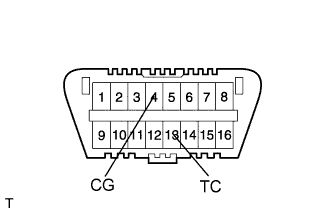
Using SST, connect terminals 13 (TC) and 4 (CG) of the DLC3.
- SST
- 09843-18040
Turn the ignition switch on.
w/o Multi-information display:
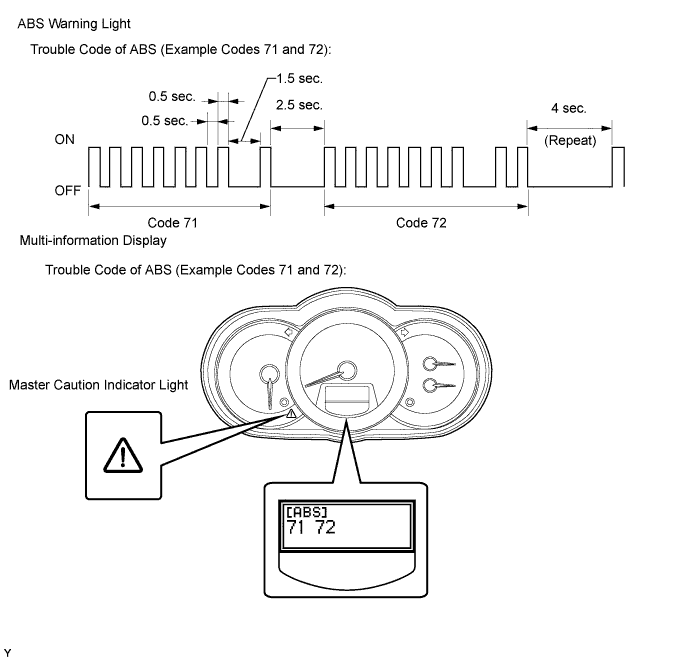
Count the number of blinks of the ABS warning light.w/ Multi-information display:
Count the number of blinks of the ABS warning light, and read the "[ABS]" indication on the multi-information display.- HINT:
- The master caution indicator light illuminates at the same time the ABS DTCs are displayed.
- HINT:
- As an example, the blinking patterns of the normal system code and DTCs 71 and 72 are shown below.
-
- NOTICE:
- If only DTCs are displayed, repair the malfunctioning area and clear the DTCs.
- If DTCs and test mode codes (DTC of signal check function) are displayed, repair the malfunctioning area, clear the DTCs and perform the test mode inspection.
- If only DTCs are displayed, repair the malfunctioning area and clear the DTCs.
- HINT:
- If more than 1 malfunction is detected at the same time, the lowest numbered code will be displayed first.
- If DTCs or test mode codes are not displayed, the ABS warning light outputs the normal system code (the light comes on and goes off at 0.25 second intervals) or "FF" is displayed on the multi-information display.
- See the list of DTCs (refer to the "DTC OF TEST MODE FUNCTION (SIGNAL CHECK)" table).
- If all sensors are normal, a normal system code is output (the light comes on and goes off at 0.25 second intervals).
- If more than 1 malfunction is detected at the same time, the lowest numbered code will be displayed first.
After the check, disconnect SST from terminals 13 (TC) and 4 (CG) of the DLC3.
Turn the ignition switch off.
| DTC OF TEST MODE FUNCTION (SIGNAL CHECK) |
| Code No. |
Diagnosis |
Trouble Areas |
| C1271/71 |
Low output signal of front speed sensor RH |
|
| C1272/72 |
Low output signal of front speed sensor LH |
|
| C1273/73 |
Low output signal of rear speed sensor RH |
|
| C1274/74 |
Low output signal of rear speed sensor LH |
|
| C1275/75 |
Abnormal change in output signal of front speed sensor RH |
|
| C1276/76 |
Abnormal change in output signal of front speed sensor LH |
|
| C1277/77 |
Abnormal change in output signal of rear speed sensor RH |
|
| C1278/78 |
Abnormal change in output signal of rear speed sensor LH |
|
| C1279/79 |
Acceleration sensor output voltage malfunction |
Deceleration sensor |
- HINT:
- The DTCs in this table are only output in test mode.
- Detection of DTCs from C1271/71 to C1274/74 is completed before the vehicle speed reaches 5 km/h (3 mph).
- Detection of DTCs from C1275/75 to C1278/78 is completed several seconds after the vehicle speed exceeds 45 km/h (28 mph).
- C1271/71 - C1274/74: Speed output from only one wheel is extremely low despite other wheel speed outputs reaching 5 km/h (3 mph).
-
C1275/75 - C1278/78: Abnormal speed sensor output frequency is as shown in the illustration.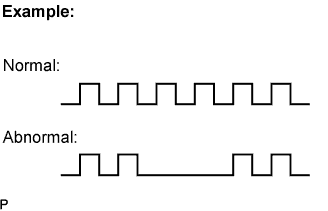
- The DTCs in this table are only output in test mode.