RM30B0U
_56
Audio / Visual / Telematics
_009009
NAVIGATION / MULTI INFO DISPLAY
_0104226
NAVIGATION SYSTEM
J
NAVIGATION / MULTI INFO DISPLAY NAVIGATION SYSTEM Screen Flicker or Color Distortion
PROCEDURE
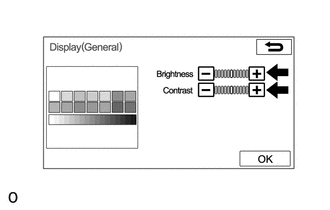
1.CHECK DISPLAY SETTING
a.
0.115,0.073 0.427,0.229
0.313,0.156
10
false
*a
| *a | Example |
Display the "Display (General)" screen.
b.
Reset display settings (contrast, brightness) and check that the screen appears normal.
- OK:
The display returns to normal.
- Result:
Proceed to OK NG
OK
PROCEED TO NEXT SUSPECTED AREA SHOWN IN PROBLEM SYMPTOMS TABLE
Click hereAudio / Visual / Telematics>NAVIGATION / MULTI INFO DISPLAY>NAVIGATION SYSTEM>PROBLEM SYMPTOMS TABLE
NG
REPLACE NAVIGATION RECEIVER ASSEMBLY