NETWORKING NETWORK GATEWAY ECU(for LHD) REMOVAL
PROCEDURE

 1. PRECAUTION
- NOTICE:
-
After turning the ignition switch off, waiting time may be required before disconnecting the cable from the negative (-) battery terminal. Therefore, make sure to read the disconnecting the cable from the negative (-) battery terminal notice before proceeding with work.
-
Click hereGeneral>INTRODUCTION>REPAIR INSTRUCTION>PRECAUTION
2.DISCONNECT CABLE FROM NEGATIVE BATTERY TERMINAL
- CAUTION:
-
Wait at least 90 seconds after disconnecting the cable from the negative (-) battery terminal to disable the SRS system.
- NOTICE:
-
When disconnecting the cable, some systems need to be initialized after the cable is reconnected.
-
Click hereGeneral>INTRODUCTION>REPAIR INSTRUCTION>INITIALIZATION
55607
3.REMOVE NO. 2 INSTRUMENT PANEL UNDER COVER SUB-ASSEMBLY
55550
4.REMOVE GLOVE COMPARTMENT DOOR ASSEMBLY
82877
5.REMOVE ECU INTEGRATION BOX RH
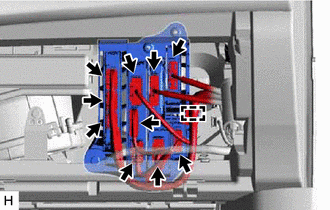
Disconnect each connector and detach the wire harness clamp.
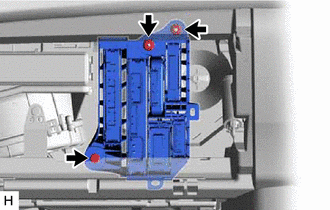
Remove the 2 nuts and bolt and ECU integration box RH.
89111
6.REMOVE NETWORK GATEWAY ECU
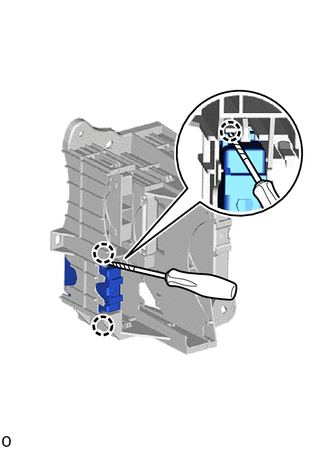

|
Protective Tape |
Using a screwdriver, insert it to the ECU integration box RH and detach the 2 claws.
- HINT:
-
Tape the screwdriver tip before use.
Pull out and remove the network gateway ECU from the ECU integration box RH.