K120 MULTIDRIVE / CVT CONTINUOUSLY VARIABLE TRANSAXLE SYSTEM P158900 Acceleration Sensor Learning Value
DESCRIPTION
The TCM stores this DTC if Deceleration Sensor Zero Point Calibration has not been performed or has failed after system components, such as the TCM, have been replaced.
| DTC No. | Detection Item | DTC Detection Condition | Trouble Area | MIL | Memory | Note |
|---|---|---|---|---|---|---|
| P158900 | Acceleration Sensor Learning Value | Either of the following conditions is met (1-trip detection logic):
·
When the vehicle speed is 2 km/h (1 mph) or more, Deceleration Sensor Zero Point Calibration has not been completed.*1 ·
When Deceleration Sensor Zero Point Calibration is performed, the learned values are abnormal (out of normal range).*2 |
DTC Detection Condition*1:
Deceleration Sensor Zero Point Calibration has not been performed. DTC Detection Condition*2: ·
Vehicle was not stable during Deceleration Sensor Zero Point Calibration. ·
Yaw rate and acceleration sensor (Airbag sensor assembly) ·
TCM |
Does not come on | DTC stored | SAE Code:
P1589 |
| Vehicle Condition | |||
|---|---|---|---|
| Pattern 1 | Pattern 2 | ||
| Diagnostic Condition | The vehicle speed is 2 km/h (1 mph) or more | ○ | - |
| Deceleration Sensor Zero Point Calibration has been performed | - | ○ | |
| Malfunction Condition | Deceleration Sensor Zero Point Calibration has not been completed | ○ | - |
| The learned values are abnormal (out of normal range) | - | ○ | |
| Duration | - | - | |
| Detection Logic | 1-trip detection logic | 1-trip detection logic | |
- HINT:
-
This DTC is stored when either of the above detection patterns is met.
CONFIRMATION DRIVING PATTERN
- CAUTION:
-
When performing the confirmation driving pattern, obey all speed limits and traffic laws.
- HINT:
-
After repairs have been completed, clear the DTCs and then check that the vehicle has returned to normal by performing the following All Readiness check procedure.
Connect the GTS to the DLC3.
Turn the ignition switch to ON and turn the GTS on.
Clear the DTCs (even if no DTCs are stored, perform the clear DTC procedure).
Turn the ignition switch off and wait for at least 30 seconds.
Turn the ignition switch to ON and turn the GTS on.
Start the engine.
Drive the vehicle at 2 km/h (1 mph) or more.
Stop the vehicle.
Enter the following menus: Powertrain / Transmission / Utility / All Readiness.
Input the DTC: P158900.
Check the DTC judgment result.
| GTS Display | Description |
|---|---|
| NORMAL | ·
DTC judgment completed ·
System normal |
| ABNORMAL | ·
DTC judgment completed ·
System abnormal |
| INCOMPLETE | ·
DTC judgment not completed ·
Perform driving pattern after confirming DTC enabling conditions |
| N/A | ·
Unable to perform DTC judgment ·
Number of DTCs which do not fulfill DTC preconditions has reached ECU memory limit |
- HINT:
- ·
If the judgment result shows NORMAL, the system is normal.
·If the judgment result shows ABNORMAL, the system has a malfunction.
·If the judgment result shows INCOMPLETE or N/A, perform the Confirmation Driving Pattern and check the DTC judgment result again.
CAUTION / NOTICE / HINT
- CAUTION:
- ·
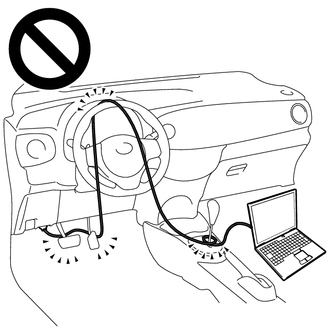
Strictly observe posted speed, limits, traffic laws and road conditions.
·Do not drive the vehicle with the cable of the GTS contacting the pedals, shift lever or steering wheel.
·Driving the vehicle with the cable of the GTS contacting these areas could impede vehicle control, resulting in a serious accident.
- ·
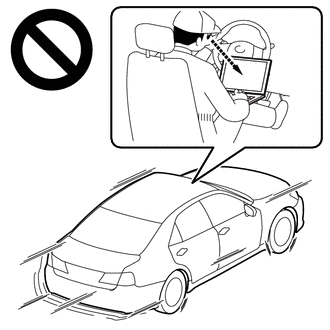
Do not operate the GTS while driving the vehicle.
·Operating the GTS while driving the vehicle will prevent you from paying sufficient attention to vehicle surroundings, and could result in a serious accident.
- NOTICE:
- ·
Perform registration and/or initialization when parts related to the continuously variable transaxle system are replaced.
Click hereDrivetrain>K120 (MULTIDRIVE / CVT)>CONTINUOUSLY VARIABLE TRANSAXLE SYSTEM>PRECAUTION
·Check that no DTCs are stored after performing initialization.
Click hereDrivetrain>K120 (MULTIDRIVE / CVT)>CONTINUOUSLY VARIABLE TRANSAXLE SYSTEM>DTC CHECK / CLEAR
- HINT:
-
Read freeze frame data using the GTS. Freeze frame data records the engine condition when malfunctions are detected. When troubleshooting, freeze frame data can help determine if the vehicle was moving or stationary, if the engine was warmed up or not, if the air fuel ratio was lean or rich, and other data from the time the malfunction occurred.
PROCEDURE
- NOTICE:
- ·
If CVT Oil Pressure Calibration is performed before Deceleration Sensor Zero Point Calibration, DTC P158900 will be stored. In this case, perform steps *1, *2, *3, *4 and *5 to return the system to normal.
·Always perform calibration with the vehicle on level ground (Inclination: 0 +/- 0.25°).
·Do not shake or vibrate the vehicle during calibration.
Turn the ignition switch off.*1
Move the shift lever to P and apply the parking brake.*2
Connect the GTS to the DLC3.
Turn the ignition switch to ON.*3
- NOTICE:
-
Do not start the engine.
Enter the following menus: Powertrain / Transmission / Utility / Reset Memory.*4
- Powertrain > Transmission > Utility
-
Tester Display Reset Memory - 50005 373 8001
Enter the following menus: Powertrain / Transmission / Utility / Deceleration Sensor Zero Point Calibration.*5
- Powertrain > Transmission > Utility
-
Tester Display Deceleration Sensor Zero Point Calibration - 50005 373 8002
- HINT:
- ·
When "Complete" is displayed on the screen, Deceleration Sensor Zero Point Calibration is complete.
·If "Error" is displayed on the screen, there may be a malfunction in the yaw rate and acceleration sensor (airbag sensor assembly) circuit.
·Shaking or vibrating the vehicle during Deceleration Sensor Zero Point Calibration may cancel calibration. If "Error" is displayed on the screen, perform step *5 again.
If "Error" is displayed on the GTS, read the DTCs using the GTS.
- Result:
Result Proceed to Deceleration Sensor Zero Point Calibration is completed normally A DTC P158900 is output B
A
B
- NOTICE:
-
Do not perform Reset Memory and clear the learned values.
Turn the ignition switch off and wait at least 30 seconds.
Connect the GTS to the DLC3.
Turn the ignition switch to ON and wait at least 2 seconds.
- NOTICE:
-
Do not start the engine.
- HINT:
-
CVT Oil Pressure Sensor Zero Point Calibration is performed when the ignition switch is turned to ON (engine stopped). However, CVT Oil Pressure Sensor Zero Point Calibration will not be performed under the following conditions:
- ·
Oil pressure sensor value is 0.065 MPa (0.663 kgf/cm2, 9.43 psi) or higher.
·CVT oil temperature is 0°C (32°F) or less, or 120°C (248°F) or higher.
Enter the following menus: Powertrain / Transmission / Utility / CVT Oil Pressure Calibration
- Powertrain > Transmission > Utility
-
Tester Display CVT Oil Pressure Calibration - 50005 373 2122
- HINT:
- ·
When performing CVT Oil Pressure Calibration, the engine idle speed will increase.
·When "Complete" is displayed on the screen, CVT Oil Pressure Calibration is complete.
·The learned values cannot be cleared by only disconnecting and reconnecting the cable to the negative (-) battery terminal.
Start the engine and wait at least 5 seconds.
- NOTICE:
- ·
Start the engine with the shift lever in P.
·After starting the engine, do not operate the accelerator pedal.
Perform the CVT Oil Pressure Calibration.
Check for DTCs again.
- Powertrain > Transmission > Trouble Codes
- 50001 373
- Result:
Proceed to NEXT
NEXT
Check the airbag sensor assembly installation condition.
Click hereVehicle Interior>SUPPLEMENTAL RESTRAINT SYSTEMS>CENTER AIRBAG SENSOR ASSEMBLY>INSTALLATION
- OK:
The airbag sensor assembly is not tilted and its installation bolts are tightened to the specified torque, the airbag sensor assembly bracket is not deformed and there are no foreign objects under the airbag sensor assembly.
- Result:
Proceed to OK NG
OK
NG
Connect the GTS to the DLC3.
Turn the ignition switch to ON.
Turn the GTS on.
Enter the following menus: Powertrain / Transmission / Data List / Acceleration Sensor Voltage.
According to the display on the GTS, read the Data List.
- Powertrain > Transmission > Data List
-
Tester Display Measurement Item Range Normal Condition Diagnostic Note Acceleration Sensor Voltage Converted output voltage of yaw rate and acceleration sensor Min.: 0.000 V
Max.: 79.998 V·2.31 to 2.69 V: Vehicle on level ground
·1.88 to 2.5 V: Decelerating
·2.5 to 3.11 V: Accelerating
·Stuck at 1.87 V: G sensor malfunction
·Stuck at 1.87 V: Communication malfunction
-
- Powertrain > Transmission > Data List
-
Tester Display Acceleration Sensor Voltage - 50003 373 388
- Result:
Result Proceed to Data List value is normal A Data List value is not normal B
A
B
Replace the TCM.
- Result:
Proceed to NEXT
NEXT
for Registration: Click hereDrivetrain>K120 (MULTIDRIVE / CVT)>CONTINUOUSLY VARIABLE TRANSAXLE SYSTEM>REGISTRATION
for Initialization: Click hereDrivetrain>K120 (MULTIDRIVE / CVT)>CONTINUOUSLY VARIABLE TRANSAXLE SYSTEM>INITIALIZATION
Replace the airbag sensor assembly.
Click hereVehicle Interior>SUPPLEMENTAL RESTRAINT SYSTEMS>CENTER AIRBAG SENSOR ASSEMBLY>REMOVAL
- Result:
Proceed to NEXT
NEXT
Reinstall or replace the airbag sensor assembly.
Click hereVehicle Interior>SUPPLEMENTAL RESTRAINT SYSTEMS>CENTER AIRBAG SENSOR ASSEMBLY>INSTALLATION
- Result:
Proceed to NEXT
NEXT