HYBRID / BATTERY CONTROL FUSE BOX(for NICKEL METAL HYDRIDE BATTERY) REMOVAL
CAUTION / NOTICE / HINT
The necessary procedures (adjustment, calibration, initialization, or registration) that must be performed after parts are removed and installed, or replaced during hybrid battery terminal block removal/installation are shown below.
| Replaced Part or Performed Procedure | Necessary Procedures | Effect/Inoperative Function when Necessary Procedure not Performed | Link |
|---|---|---|---|
|
*: When performing learning using the GTS. Click here( |
|||
| Auxiliary battery terminal is disconnected/reconnected | Perform steering sensor zero point calibration | Lane control system | ( ) |
| Parking support brake system* | |||
| Pre-collision system | |||
| Memorize steering angle neutral point | Parking assist monitor system | ()
|
|
| Panoramic view monitor system | ()
|
||
| Reset back door close position | Power back door system | ()
|
|
| Power back door initialization | Power door lock control system | ()
|
|
| Replacement of hybrid battery terminal block | High voltage fuse accumulated load history reset | DTCs are stored | for 2WD:()
for 4WD/AWD:( )
|
- CAUTION:
- ·
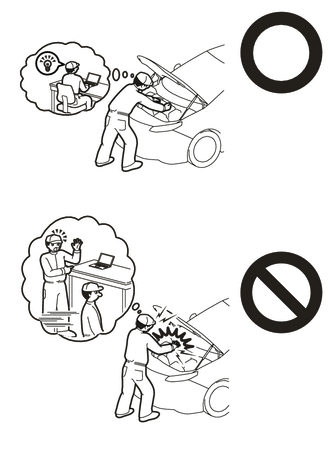
Orange wire harnesses and connectors indicate high-voltage circuits. To prevent electric shock, always follow the procedure described in the repair manual.
-
·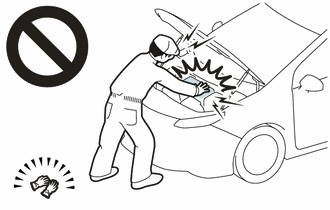
To prevent electric shock, wear insulated gloves when working on wire harnesses and components of the high voltage system.
- NOTICE:
-
After the power switch is turned off, the navigation system requires approximately a minute to record various types of memory and settings. As a result, after turning the power switch off, wait a minute or more before disconnecting the cable from the negative (-) auxiliary battery terminal.
PROCEDURE

 1. PRECAUTION
- NOTICE:
-
After turning the power switch off, waiting time may be required before disconnecting the cable from the negative (-) auxiliary battery terminal. Therefore, make sure to read the disconnecting the cable from the negative (-) auxiliary battery terminal notices before proceeding with work.
G9510
2.REMOVE HV BATTERY
G920NB
3.REMOVE UPPER HV BATTERY COVER SUB-ASSEMBLY
G92Q1
4.REMOVE NO. 1 HV BATTERY SHIELD PANEL
G92Z2
5.REMOVE HYBRID BATTERY TERMINAL BLOCK
- CAUTION:
-
Be sure to wear insulated gloves and protective goggles.
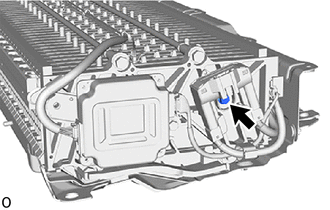
Remove the bolt to separate the hybrid battery terminal block from the HV battery.
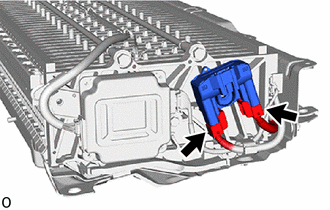
Disconnect the 2 hybrid battery terminal block connectors to remove the hybrid battery terminal block.
- NOTICE:
-
Insulate the disconnected high-voltage connectors with insulating tape.