AUDIO / VIDEO INSTRUMENT PANEL SPEAKER REMOVAL
PROCEDURE

 62211
1.REMOVE FRONT PILLAR GARNISH RH
62212
2.REMOVE FRONT PILLAR GARNISH LH
55409F
3.REMOVE NO. 2 INSTRUMENT PANEL SPEAKER PANEL SUB-ASSEMBLY
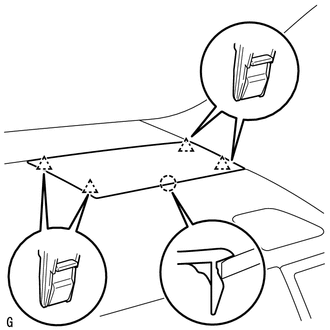
Disengage the 4 clips and claw and remove the speaker panel.
55409A
4.REMOVE NO. 1 INSTRUMENT PANEL SPEAKER PANEL SUB-ASSEMBLY
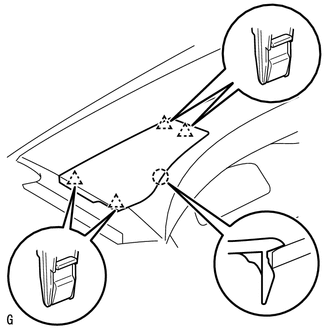
Disengage the 4 clips and claw and remove the speaker panel.
86160P
5.REMOVE FRONT NO. 2 SPEAKER ASSEMBLY RH
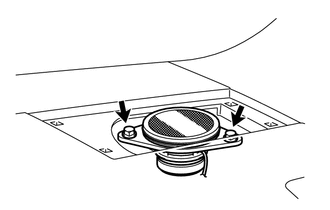
Remove the 2 bolts.
Remove the speaker and disconnect the connector.
- NOTICE:
-
Do not touch the cone part of the speaker.
86160P
6.REMOVE FRONT NO. 2 SPEAKER ASSEMBLY LH
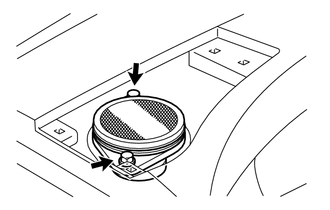
Remove the 2 bolts.
Remove the speaker and disconnect the connector.
- NOTICE:
-
Do not touch the cone part of the speaker.
55474E
7.REMOVE NO. 3 INSTRUMENT PANEL SPEAKER PANEL SUB-ASSEMBLY (for 14 Speakers)
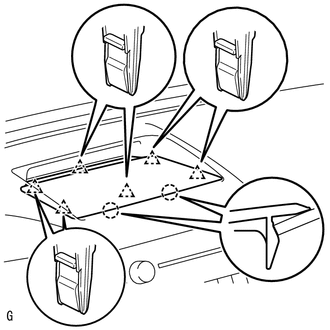
Disengage the 6 clips and 2 claws and remove the speaker panel.
86160L
8.REMOVE FRONT NO. 4 SPEAKER ASSEMBLY (for 14 Speakers)
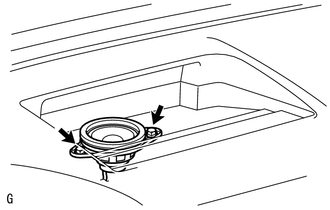
Remove the 2 bolts.
Remove the speaker and disconnect the connector.
- NOTICE:
-
Do not touch the cone part of the speaker.