AUDIO / VIDEO TELEVISION DISPLAY REMOVAL
PROCEDURE

 1. PRECAUTION
- NOTICE:
-
After turning the ignition switch off, waiting time may be required before disconnecting the cable from the battery terminal. Therefore, make sure to read the disconnecting the cable from the battery terminal notice before proceeding with work (See page General>INTRODUCTION>REPAIR INSTRUCTION>PRECAUTION).
2.DISCONNECT CABLE FROM NEGATIVE BATTERY TERMINAL
- CAUTION:
-
Wait at least 90 seconds after disconnecting the cable from the negative (-) battery terminal to disable the SRS system.
- NOTICE:
-
When disconnecting the cable some systems need to be initialized after the cable is reconnected (See page General>INTRODUCTION>REPAIR INSTRUCTION>INITIALIZATION ).
81240
3.REMOVE ROOM NO. 1 LIGHT ASSEMBLY
86680A
4.REMOVE TELEVISION DISPLAY ASSEMBLY
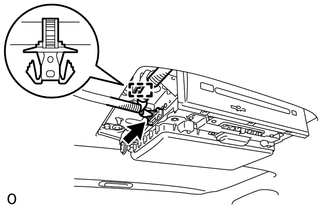
Detach the clamp.
Disconnect the connector.
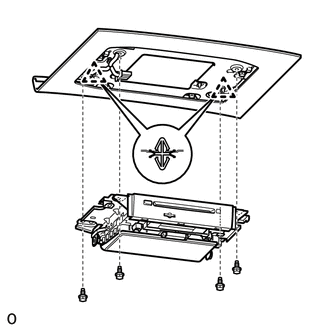
Remove the 4 bolts.
Detach the 2 clips and remove the television display.
63310
5.REMOVE ROOF HEADLINING ASSEMBLY
Remove the roof headlining (See page Vehicle Interior>INTERIOR PANELS / TRIM>ROOF HEADLINING>REMOVAL).
86291
6.REMOVE TELEVISION DISPLAY BRACKET
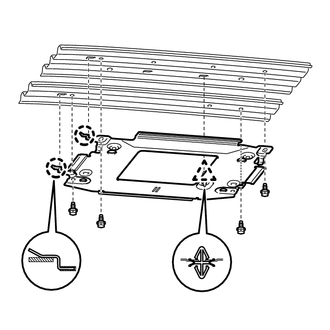
Remove the 4 bolts.
Detach the clip and 2 claws, and remove the bracket.