DOOR / HATCH POWER BACK DOOR SYSTEM Power Back Door cannot be Operated Using Any Switch
DESCRIPTION
When the power back door cannot be operated using any switch, one of the following may be the cause: 1) initialization of the power back door ECU, or a malfunction in the 2) power back door touch sensor circuit, 3) back door closer system, 4) meter/gauge system, 5) main body ECU (instrument panel junction block LH), or 6) power back door drive unit (power back door ECU).
WIRING DIAGRAM
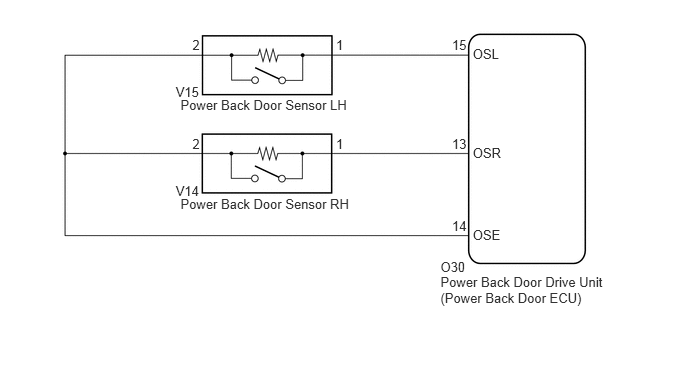
PROCEDURE
Check that the power back door drive unit (power back door ECU) can be initialized (See page Vehicle Exterior>DOOR / HATCH>POWER BACK DOOR SYSTEM>INITIALIZATION).
NEXT
Check the power back door system operation.
- OK:
Power back door system operates normally.
OK
NG
Check the back door closer system operation (See page Vehicle Exterior>DOOR / HATCH>BACK DOOR CLOSER SYSTEM>OPERATION CHECK).
OK
NG
Check the A/T shift position indicator operation.
Check that the speedometer indicates 0 mph when the vehicle is stopped and the engine idling.
OK
NG
(See pageVehicle Interior>METER / GAUGE / DISPLAY>METER / GAUGE SYSTEM>HOW TO PROCEED WITH TROUBLESHOOTING)
Check for the DTCs (See page Vehicle Exterior>DOOR / HATCH>POWER BACK DOOR SYSTEM>DTC CHECK / CLEAR).
| Result | Proceed to |
|---|---|
| DTC is not output | A |
| B2250 is output | B |
| B2251 is output | C |
A
B
C
Connect the Techstream to the DLC3
Turn the ignition switch to ON.
Turn the Techstream on.
Enter the following menus: Body Electrical / Main Body / Data List /
According to the display on the Techstream, read the Data List.
| Tester Display | Measurement Item/Range | Normal Condition | Diagnostic Note |
|---|---|---|---|
| Back Dor Open | Back door lock / Permit or prohibit | Permit: Back door is unlocked
Prohibit: Back door is locked |
- |
- OK:
The back door functions as specified in the normal condition.
OK
NG
Connect the Techstream to the DLC3
Turn the ignition switch to ON.
Turn the Techstream on.
Enter the following menus: Body Electrical / Back Door / Data List /
According to the display on the Techstream, read the Data List.
| Tester Display | Measurement Item/Range | Normal Condition | Diagnostic Note |
|---|---|---|---|
| PBD Touch Sen L | Power back door touch sensor LH signal / ON or OFF | ON: Power back door touch sensor LH pressed
OFF: Power back door touch sensor LH not pressed |
- |
| PBD Touch Sen R | Power back door touch sensor RH signal / ON or OFF | ON: Power back door touch sensor RH pressed
OFF: Power back door touch sensor RH not pressed |
- |
- OK:
The power back door touch sensor functions as specified in the normal condition.
OK
NG