NAVIGATION / MULTI INFO DISPLAY TELEVISION TUNER REMOVAL
CAUTION / NOTICE / HINT
- CAUTION:
- ·
Working on 12 V vehicle electrical system.
Risk of short circuits! Risk of fire!
-Detach battery earth lead from battery.
- NOTICE:
- ·
Electrostatic discharge.
Damage to or destruction of electrical components.
-Leave electrical components in original packaging until just before they are installed. Use the original packaging only for any return shipments. Always package removed components straight away.
-Only touch the housings of electrical components. Do not touch pins or multi-pin connectors directly.
-Antistatic work clothing and antistatic shoes (with ESD symbol).
-For additional information see:
Click hereGeneral>INTRODUCTION>REPAIR INSTRUCTION>PRECAUTION
- ·
Before performing work on electronic components, disconnect the cable from the negative (-) battery terminal to prevent damage to the electrical system or components.
·When disconnecting the cable, turn the START-STOP button (engine switch) and headlight switch off and loosen the cable nut completely. Perform these operations without twisting or prying on the cable. Then disconnect the cable.
·Clock settings, radio settings, audio system memory, DTCs and other data will be cleared when the cable is disconnected from the negative (-) battery terminal. Write down any necessary data before disconnecting the cable.
PROCEDURE

 64740B
1.REMOVE DECK TRIM SIDE BOARD AND DECK SIDE TRIM COVER LH
2.REMOVE DIGITAL TELEVISION TUNER ASSEMBLY WITH BRACKET
- NOTICE:
- ·
Electrostatic discharge.
Damage to or destruction of electrical components.
-Leave electrical components in original packaging until just before they are installed. Use the original packaging only for any return shipments. Always package removed components straight away.
-Only touch the housings of electrical components. Do not touch pins or multi-pin connectors directly.
-Antistatic work clothing and antistatic shoes (with ESD symbol).
-For additional information see:
Click hereGeneral>INTRODUCTION>REPAIR INSTRUCTION>PRECAUTION
- ·
Damage to wires when disconnecting connectors and plug connections.
Sheared wires can cause a short circuit.
-Do not pull on the wires when disconnecting connectors and plug connections.
- ·
Sensitive optical fibers.
Damaged optical fibers can result in operating failure of the LED.
-Do not bend optical fibers too much and do not kink, as well. The minimum permissible bending radius is 25 mm.
-Avoid pressure and tensile loads and heat influences on the optical fiber.
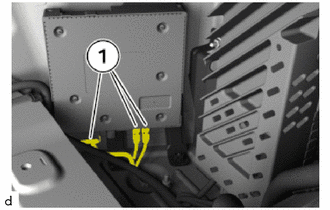
Unlock plug connections (1) and disconnect.
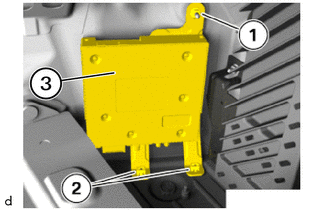
Loosen nut (1).
Detach the clamps (2) to remove the digital television tuner assembly with bracket (3).
3.REMOVE DIGITAL TELEVISION TUNER ASSEMBLY
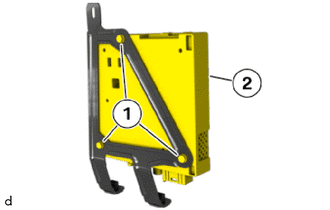
Loosen bolts (1).
Remove the digital television tuner assembly (2) from the No. 1 digital television bracket set.