TELEMATICS TELEPHONE ANTENNA REMOVAL
PROCEDURE

 64740B
1.REMOVE DECK TRIM SIDE BOARD AND DECK SIDE TRIM COVER LH
2.REMOVE EMERGENCY GSM AERIAL
- NOTICE:
- ·
Electrostatic discharge.
Damage to or destruction of electrical components.
-Leave electrical components in original packaging until just before they are installed. Use the original packaging only for any return shipments. Always package removed components straight away.
-Only touch the housings of electrical components. Do not touch pins or multi-pin connectors directly.
-Antistatic work clothing and antistatic shoes (with ESD symbol).
-For additional information see:
Click hereGeneral>INTRODUCTION>REPAIR INSTRUCTION>PRECAUTION
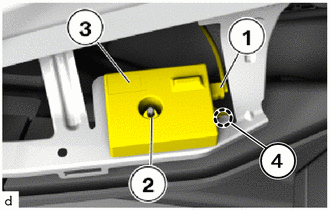
Unlock plug connection (1) and disconnect.
Loosen nut (2).
Detach the guide (4) to remove the emergency GSM aerial (3).