Home › SUSPENSION & AXLE › TIRE AND WHEEL › TIRE PRESSURE WARNING SYSTEM

TIRE PRESSURE WARNING SYSTEM > INITIALIZATION

for Preparation Click here


DESCRIPTION OF INITIALIZATION
  1. Perform initialization in the following cases:

    1. Before delivery of a new vehicle.
    2. After replacement of the tire pressure warning ECU.*
    3. After replacement of the tire pressure warning valve and transmitter.*
    4. Specified tire pressure changes depending on the size or type of tire.

    HINT:
    *: Perform initialization after the transmitter ID registration is completed (Click here).

  2. Before initialization

    1. Set the air pressure of all tires to the specified values (Click here).

      NOTICE:
      Make sure the tires are cooled down.


INITIALIZATION PROCEDURE
  1. Turn the ignition switch to ON.

  2. Press and hold the tire pressure warning reset switch for 3 seconds or more so that the tire pressure warning light blinks 3 times.

  3. Turn the ignition switch off.

  4. Connect the Techstream to the DLC3.

  5. Turn the ignition switch to ON.

  6. Turn the Techstream on.

  7. Enter the following menus: Chassis / Tire Pressure Monitor / Data List

  8. Check that the initialization has been completed.

  9. Confirm that the tire pressure data of all tires are displayed on the Techstream screen.

    NOTICE:
    1. The initialization is normally completed within 2 to 3 minutes.
    2. If the initialization has not been completed successfully, DTC C2177/77 is set after a vehicle speed of 8 km/h (5 mph) or more continues for 20 minutes or more.
    3. While in test mode, the system will not change to initialization mode even if the initialization switch is pushed.

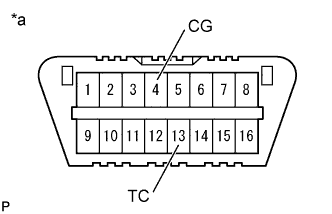
    4. C146309E93
      The initialization can be terminated by connecting terminals 13 (TC) and 4 (CG) of the DLC3.

    Text in Illustration 
    *a
    Front view of DLC3


Tire Pressure Monitor 
Tester Display
Measurement Item/Range
Normal Condition
Diagnostic Note
ID1 Tire Inflation Pressure
ID1 tire inflation pressure/
min.: Absolute pressure / 0 kPa (0 kgf/cm2, 0 psi), Relative pressure / -100 kPa (-1 kgf/cm2, -14 psi)
max.: Absolute pressure / 637.5 kPa (6.5 kgf/cm2, 92 psi), Relative pressure / 537.5 kPa (5.4 kgf/cm2, 78 psi)
Actual tire inflation pressure
If 0 kPa (0 kgf/cm2, 0 psi) is displayed for absolute pressure or -100 kPa (-1 kgf/cm2, -14 psi) is displayed for relative pressure, data has not been received.*
ID2 Tire Inflation Pressure
ID2 tire inflation pressure/
min.: Absolute pressure / 0 kPa (0 kgf/cm2, 0 psi), Relative pressure / -100 kPa (-1 kgf/cm2, -14 psi)
max.: Absolute pressure / 637.5 kPa (6.5 kgf/cm2, 92 psi), Relative pressure / 537.5 kPa (5.4 kgf/cm2, 78 psi)
Actual tire inflation pressure
If 0 kPa (0 kgf/cm2, 0 psi) is displayed for absolute pressure or -100 kPa (-1 kgf/cm2, -14 psi) is displayed for relative pressure, data has not been received.*
ID3 Tire Inflation Pressure
ID3 tire inflation pressure/
min.: Absolute pressure / 0 kPa (0 kgf/cm2, 0 psi), Relative pressure / -100 kPa (-1 kgf/cm2, -14 psi)
max.: Absolute pressure / 637.5 kPa (6.5 kgf/cm2, 92 psi), Relative pressure / 537.5 kPa (5.4 kgf/cm2, 78 psi)
Actual tire inflation pressure
If 0 kPa (0 kgf/cm2, 0 psi) is displayed for absolute pressure or -100 kPa (-1 kgf/cm2, -14 psi) is displayed for relative pressure, data has not been received.*
ID4 Tire Inflation Pressure
ID4 tire inflation pressure/
min.: Absolute pressure / 0 kPa (0 kgf/cm2, 0 psi), Relative pressure / -100 kPa (-1 kgf/cm2, -14 psi)
max.: Absolute pressure / 637.5 kPa (6.5 kgf/cm2, 92 psi), Relative pressure / 537.5 kPa (5.4 kgf/cm2, 78 psi)
Actual tire inflation pressure
If 0 kPa (0 kgf/cm2, 0 psi) is displayed for absolute pressure or -100 kPa (-1 kgf/cm2, -14 psi) is displayed for relative pressure, data has not been received.*

HINT:
  1. The initialization is complete when the Data List "ID Tire Inflation Pressure" display shows the correct pressures.
  2. *: It may take about 2 or 3 minutes until the values are displayed. If the values are not displayed after a few minutes, perform troubleshooting according to the inspection procedure for DTCs C2121/21 to C2124/24 (Click here).