
DTC 01-DD Master Reset |
DTC 01-E1 Voice Processing Device ON Error |
| DTC No. | DTC Detection Condition | Trouble Area |
| 01-DD*1 | Device that should be master has been disconnected after engine starts. |
|
| 01-E1*1, *2 | Amplifier device records that amplifier output does not function even while source device is operating. |
| 1.CHECK NAVIGATION RECEIVER POWER SOURCE CIRCUIT |
Refer to the navigation receiver power source circuit (Click here).
If the power source circuit is operating normally, proceed to the next step.
| NEXT | |
|
| 2.INSPECT NAVIGATION RECEIVER |
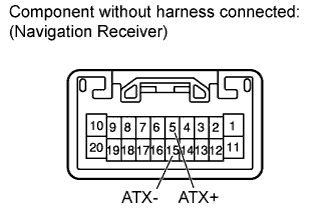 |
Disconnect the K18 receiver connector.
Measure the resistance according to the value(s) in the table below.
| Tester Connection | Condition | Specified Condition |
| 5 (ATX+) - 15 (ATX-) | Always | 60 to 80 Ω |
| Result | Proceed to |
| OK | A |
| NG (for Column Shift Type) | B |
| NG (for Floor Shift Type) | C |
|
| ||||
|
| ||||
| A | |
|
| 3.IDENTIFY COMPONENT WHICH HAS STORED THIS CODE |
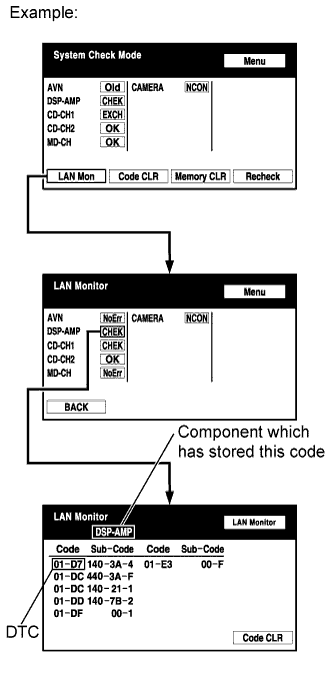 |
Enter the diagnostic mode.
Press the "LAN Mon" switch to change to "LAN Monitor" mode.
Identify the component which has stored this code.
| Display | Component |
| AVN | Navigation receiver |
| DSP-AMP | Stereo component amplifier |
| NEXT | |
|
| 4.CHECK HARNESS AND CONNECTOR (NAVIGATION RECEIVER - COMPONENT WHICH HAS STORED THIS CODE) |
Referring to the AVC-LAN wiring diagram below, check the AVC-LAN circuit between the navigation receiver and the component which has stored this code.
Disconnect all connectors between the navigation receiver and the component which has stored this code.
Check for an open or short in the AVC-LAN circuit between the navigation receiver and the component which has stored this code.
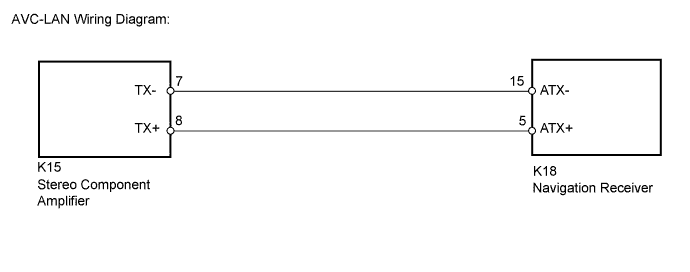
|
| ||||
| OK | |
|
| 5.REPLACE NAVIGATION RECEIVER |
Replace the navigation receiver (for Column Shift Type) with a normal one (Click here).
Replace the navigation receiver (for Floor Shift Type) with a normal one (Click here).
Check if the same problem occurs again.
|
| ||||
| OK | ||
 | ||
| ||
