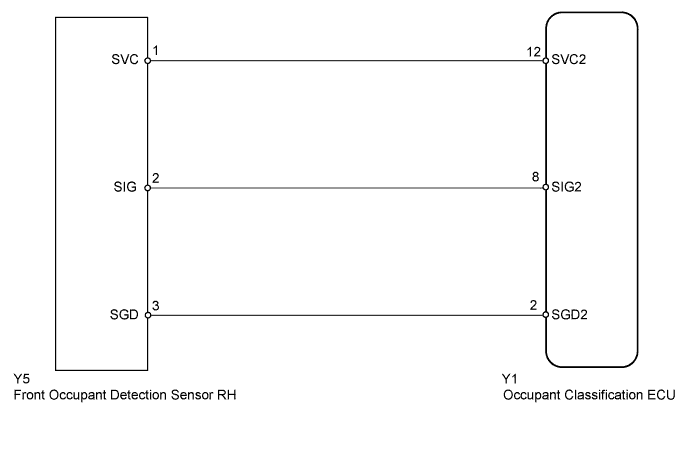
DTC B1786 Front Occupant Classification Sensor RH Collision Detection |
| DTC Code | DTC Detection Condition | Trouble Area |
| B1786 | Either of following conditions is met:
|
|
| 1.CHECK FOR DTC |
Turn the ignition switch to ON, and wait for at least 60 seconds.
Clear any DTCs stored in the center airbag sensor (Click here).
Turn the ignition switch off.
Turn the ignition switch to ON, and wait for at least 60 seconds.
Using the Techstream, check for DTCs of the occupant classification ECU (Click here).
|
| ||||
| OK | ||
 | ||
| ||
| 2.PERFORM ZERO POINT CALIBRATION |
Using the Techstream, perform the zero point calibration (Click here).
|
| ||||
| OK | |
 |
| 3.PERFORM SENSITIVITY CHECK |
Using the Techstream, perform the sensitivity check (Click here).
|
| ||||
| OK | |
|
| 4.CHECK FOR DTC |
Turn the ignition switch to ON, and wait for at least 60 seconds.
Clear any DTCs stored in the center airbag sensor (Click here).
Turn the ignition switch off.
Turn the ignition switch to ON, and wait for at least 60 seconds.
Using the Techstream, check for DTCs of the occupant classification ECU (Click here).
|
| ||||
| OK | ||
| ||
| ||
| 5.REPLACE FRONT SEAT FRAME WITH ADJUSTER ASSEMBLY RH |
Turn the ignition switch off.
Disconnect the negative (-) terminal cable from the battery, and wait for at least 90 seconds.
Replace the front seat frame with adjuster RH (Click here).
| NEXT | |
|
| 6.PERFORM ZERO POINT CALIBRATION |
Connect the negative (-) terminal cable to the battery, and wait for at least 2 seconds.
Connect the Techstream to the DLC3.
Turn the ignition switch to ON, and wait for at least 60 seconds.
Using the Techstream, perform the zero point calibration (Click here).
|
| ||||
| OK | |
|
| 7.PERFORM SENSITIVITY CHECK |
Using the Techstream, perform the sensitivity check (Click here).
|
| ||||
| OK | |
|
| 8.CHECK FOR DTC |
Turn the ignition switch to ON, and wait for at least 60 seconds.
Clear any DTCs stored in the memory (Click here).
Turn the ignition switch off.
Turn the ignition switch to ON, and wait for at least 60 seconds.
Using the Techstream, check for DTCs of the occupant classification ECU (Click here).
|
| ||||
| OK | ||
| ||
| ||
| 9.REPLACE OCCUPANT CLASSIFICATION ECU |
Turn the ignition switch off.
Disconnect the negative (-) terminal cable from the battery, and wait for at least 90 seconds.
Replace the occupant classification ECU.
| NEXT | |
|
| 10.PERFORM ZERO POINT CALIBRATION |
Connect the negative (-) terminal cable to the battery, and wait for at least 2 seconds.
Connect the Techstream to the DLC3.
Turn the ignition switch to ON, and wait for at least 60 seconds.
Using the Techstream, perform the zero point calibration (Click here).
| NEXT | |
|
| 11.PERFORM SENSITIVITY CHECK |
Using the Techstream, perform the sensitivity check (Click here).
| NEXT | ||
| ||
| ||
