RM27M0U
_56
Audio / Visual / Telematics
_049135
AUDIO / VIDEO
_0234287
REAR DOOR SPEAKER(for CrewMax)
A
AUDIO / VIDEO REAR DOOR SPEAKER(for CrewMax) INSTALLATION
CAUTION / NOTICE / HINT
- HINT:
- ·
Use the same procedure for the RH and LH sides.
·The procedure listed below is for the LH side.
PROCEDURE

 86160Y
1.INSTALL REAR NO. 2 SPEAKER ASSEMBLY
a.
Attach the 3 claws to install the rear No. 2 speaker assembly to the rear door trim board sub-assembly.
86160B
2.INSTALL REAR NO. 1 SPEAKER ASSEMBLY
a.
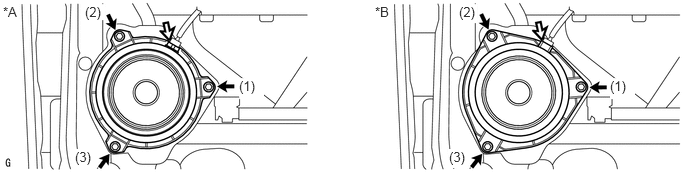
Connect the connector.
0.031,0.042 0.365,0.323
0.333,0.281
10
false
*A
3.906,0.042 4.229,0.26
0.323,0.219
10
false
*B
2.49,0.813 2.75,1.031
0.26,0.219
10
true
(1)
0.885,0.042 1.083,0.208
0.198,0.167
10
true
(2)
0.781,1.552 0.969,1.76
0.188,0.208
10
true
(3)
6.354,0.813 6.615,1.031
0.26,0.219
10
true
(1)
4.781,0.042 4.969,0.24
0.188,0.198
10
true
(2)
4.677,1.552 4.865,1.75
0.188,0.198
10
true
(3)
| *A | for Standard | *B | for 12 Speakers |
b.
Install the rear No. 1 speaker assembly with the 3 screws.
- NOTICE:
-
Do not touch the cone part of the speaker.
- HINT:
-
Install the screws in the order shown in the illustration.
67604
3.INSTALL REAR DOOR TRIM BOARD SUB-ASSEMBLY LH
74272A
4.INSTALL REAR DOOR ARMREST COVER LH
74272A
5.INSTALL REAR UPPER DOOR ARMREST BASE PANEL LH
69284D
6.INSTALL REAR DOOR INSIDE HANDLE BEZEL PLUG LH
67674A
7.INSTALL REAR DOOR FRAME GARNISH LH