RM27M0U
_56
Audio / Visual / Telematics
_049135
AUDIO / VIDEO
_0234292
AUDIO AND VISUAL SYSTEM
J
AUDIO / VIDEO AUDIO AND VISUAL SYSTEM Touch Panel Switch does not Function
PROCEDURE
1.CHECK TOUCH PANEL
a.
Check for foreign matter on the display.
- OK:
The display is clean.
OK
2.CHECK TOUCH SWITCH (OPERATION CHECK)
NG
CLEAN DISPLAY AND RECHECK TOUCH PANEL
2.CHECK TOUCH SWITCH (OPERATION CHECK)
a.
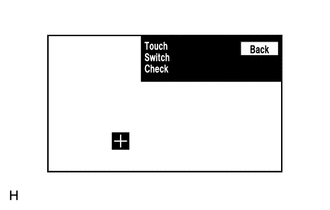
Enter the "Touch Switch Check" screen. [Refer to Check Touch Switch in Operation Check (See page Audio / Visual / Telematics>AUDIO / VIDEO>AUDIO AND VISUAL SYSTEM>OPERATION CHECK)]
b.
Touch the display in the area where the switch malfunction occurs.
- OK:
A "+" mark appears at the touched position.
| Result | Proceed to |
|---|---|
| OK (for Column Shift Type) | A |
| OK (for Floor Shift Type) | B |
| NG | C |
A
REPLACE RADIO AND DISPLAY RECEIVER ASSEMBLY
B
REPLACE RADIO AND DISPLAY RECEIVER ASSEMBLY
C
PROCEED TO NEXT SUSPECTED AREA SHOWN IN PROBLEM SYMPTOMS TABLE