RM3700E
_58
Vehicle Interior
_093029
POWER OUTLETS (INT)
_0438538
POWER OUTLET SOCKET
A
POWER OUTLETS (INT) POWER OUTLET SOCKET REMOVAL
CAUTION / NOTICE / HINT
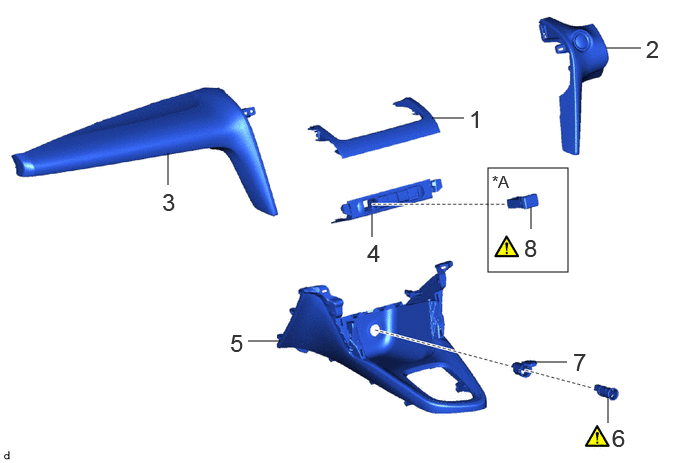
COMPONENTS (REMOVAL)
5.083,1.75 5.917,2.833
0.833,1.083
4.5,1.229 4.833,1.229
false
1.75,1.927 1.75,1.594
false
6.313,0.5 6.677,0.5
false
3.875,2.469 3.875,2.229
false
2.583,3.552 2.917,3.552
false
6.333,4.406 6.333,4.135
false
5.573,3.771 5.906,3.771
false
5.531,2.385 5.531,2.156
false
4.885,1.094 5.167,1.448
0.281,0.354
18
false
1
6.729,0.365 7.01,0.719
0.281,0.354
18
false
2
1.688,1.958 1.969,2.313
0.281,0.354
18
false
3
3.823,2.49 4.104,2.844
0.281,0.354
18
false
4
2.396,3.427 2.677,3.781
0.281,0.354
18
false
5
6.375,4.417 6.656,4.771
0.281,0.354
18
false
6
5.969,3.625 6.25,3.979
0.281,0.354
18
false
7
5.458,2.438 5.74,2.792
0.281,0.354
18
false
8
5.125,1.792 5.5,2.031
0.375,0.24
12
false
*A
| Procedure | Part Name Code | 
|

|

|
|
|---|---|---|---|---|---|
| 1 | CENTER INSTRUMENT CLUSTER FINISH PANEL GARNISH | 55475B | - | - | - |
| 2 | INSTRUMENT PANEL FINISH PANEL | 55431A | - | - | - |
| 3 | LOWER INSTRUMENT PANEL FINISH PANEL | 55432B | - | - | - |
| 4 | SWITCH HOLE BASE SUB-ASSEMBLY | 55407B | - | - | - |
| 5 | CONSOLE BOX ASSEMBLY | 58810J | - | - | - |
| 6 | NO. 1 POWER OUTLET SOCKET ASSEMBLY | 85530 | ( ) |
- | - |
| 7 | NO. 1 POWER OUTLET SOCKET COVER | 85535B | - | - | - |
| 8 | USB CHARGER SOCKET | 85532 | ()
|
- | - |
| *A | w/ USB Charger | - | - |
PROCEDURE

 55475B
1.REMOVE CENTER INSTRUMENT CLUSTER FINISH PANEL GARNISH
55431A
2.REMOVE INSTRUMENT PANEL FINISH PANEL
55432B
3.REMOVE LOWER INSTRUMENT PANEL FINISH PANEL
55407B
4.REMOVE SWITCH HOLE BASE SUB-ASSEMBLY
58810J
5.REMOVE CONSOLE BOX ASSEMBLY
85530
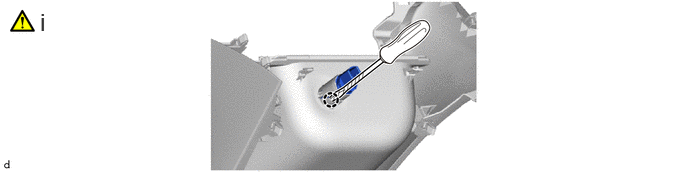
6.REMOVE NO. 1 POWER OUTLET SOCKET ASSEMBLY
a.
0.417,0.083 0.698,0.438
0.281,0.354
18
false
i
i.
Using a screwdriver with its tip wrapped in protective tape, disengage the claw to remove the No. 1 power outlet socket assembly.
85535B
7.REMOVE NO. 1 POWER OUTLET SOCKET COVER
a.

85532
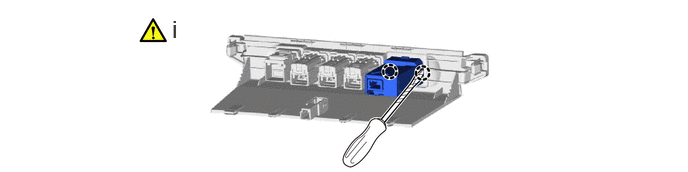
8.REMOVE USB CHARGER SOCKET (w/ USB Charger)
a.
1.792,0.156 2.073,0.51
0.281,0.354
18
false
i
i.
Using a screwdriver with its tip wrapped in protective tape, disengage the claws to remove the USB charger socket.