BRAKE (FRONT) FRONT BRAKE(for TMC Made) INSTALLATION
CAUTION / NOTICE / HINT
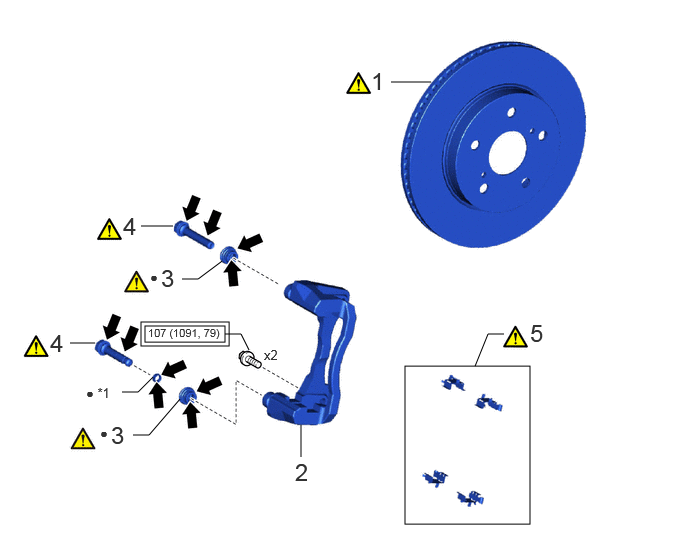
| Procedure | Part Name Code | 
|

|

|
|
|---|---|---|---|---|---|
| 1 | FRONT DISC | 43512 | ( ) |
- | - |
| 2 | FRONT DISC BRAKE CYLINDER MOUNTING | 47722 | - | - | - |
| 3 | FRONT DISC BRAKE BUSHING DUST BOOT | - | ()
|
- | - |
| 4 | FRONT DISC BRAKE CYLINDER SLIDE PIN | 47715A | ()
|
- | - |
| 5 | FRONT DISC BRAKE PAD SUPPORT PLATE | - | ()
|
- | - |
| *1 | FRONT DISC BRAKE CYLINDER SLIDE BUSHING | - | - |

|
Tightening torque for "Major areas involving basic vehicle performance such as moving/turning/stopping": N*m (kgf*cm, ft.*lbf) | ● | Non-reusable part |

|
Lithium soap base glycol grease | - | - |
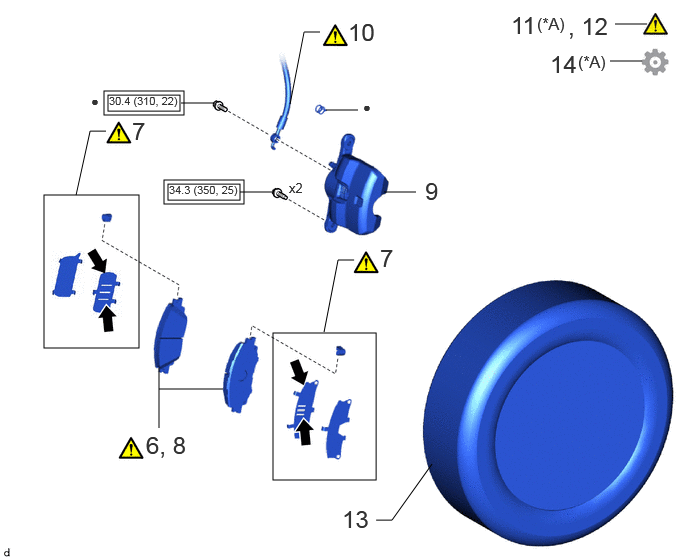
| Procedure | Part Name Code |
|
|
|
|
|---|---|---|---|---|---|
| 6 | INSPECT FRONT DISC BRAKE PAD | - | ()
|
- | - |
| 7 | FRONT DISC BRAKE ANTI-SQUEAL SHIM KIT | 04945 | ()
|
- | - |
| 8 | INSTALL FRONT DISC BRAKE PAD | - | ()
|
- | - |
| 9 | FRONT DISC BRAKE CYLINDER ASSEMBLY | 47750 | - | - | - |
| 10 | FRONT FLEXIBLE HOSE | 47313J | ()
|
- | - |
| 11 | CABLE TO NEGATIVE AUXILIARY BATTERY TERMINAL | - | ()
|
- | - |
| 12 | BLEED BRAKE LINE | - | ()
|
- | - |
| 13 | FRONT WHEEL | - | - | - | - |
| 14 | INITIALIZATION AFTER RECONNECTING AUXILIARY BATTERY TERMINAL | - | - | - | ()
|
| *A | for HV Model | - | - |
|
|
Tightening torque for "Major areas involving basic vehicle performance such as moving/turning/stopping": N*m (kgf*cm, ft.*lbf) | ● | Non-reusable part |
|
|
Disc brake grease | - | - |
CAUTION / NOTICE / HINT
- NOTICE:
- ·
Immediately after installing the brake pads, the braking performance may be reduced. Always perform a road test in a safe place while paying attention to the surroundings.
·After replacing the front disc brake pads, the brake pedal may feel soft due to clearance between the front disc brake pads and front disc. Depress the brake pedal several times until the brake pedal feels firm.
·After replacing the front disc brake pads, always perform a road test to check the braking performance and check for vibrations.
·When the brake pedal is first depressed after replacing the brake pads or pushing back the disc brake piston, DTC C13CD00, C13CE00, C140000 may be stored. As there is no malfunction, clear the DTC. (for HV Model)
·While the auxiliary battery is connected, even if the power switch is off, the brake control system activates when the brake pedal is depressed or any door courtesy switch turns on. Therefore, when servicing the brake system components, do not operate the brake pedal or open/close the doors while the auxiliary battery is connected. (for HV Model)
- HINT:
- ·
Use the same procedure for the RH side and LH side.
·The following procedure is for the LH side.
PROCEDURE

 43512
1.INSTALL FRONT DISC
|
|
|

| *a | Matchmark | - | - |
Align the matchmarks of the front disc and front axle hub sub-assembly, and install the front disc.
47722
2.INSTALL FRONT DISC BRAKE CYLINDER MOUNTING
- Torque:
- 107 N*m (1091 kgf*cm, 79 ft.*lbf)
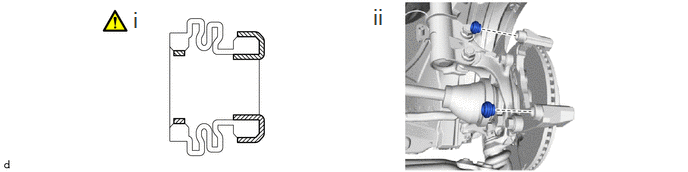
3.INSTALL FRONT DISC BRAKE BUSHING DUST BOOT

|
Lithium Soap Base Glycol Grease | - | - |
Apply a light layer of lithium soap base glycol grease to the entire circumference of 2 new front disc brake bushing dust boots.
- HINT:
-
Apply more than 0.3 g (0.01 oz) of lithium soap base glycol grease to each front disc brake bushing dust boot.
Install the 2 front disc brake bushing dust boots to the front disc brake cylinder mounting.
47715A
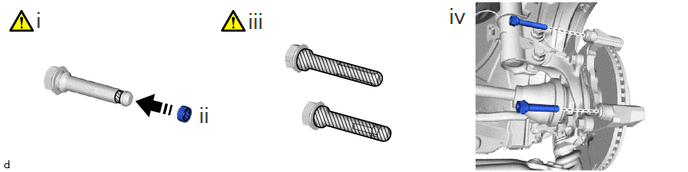
4.INSTALL FRONT DISC BRAKE CYLINDER SLIDE PIN
|
|
Lithium Soap Base Glycol Grease | - | - |
Apply a light layer of lithium soap base glycol grease to the contact surface of the front disc brake cylinder slide pin (lower side).
Install a new front disc brake cylinder slide bushing to the front disc brake cylinder slide pin (lower side).
Apply a light layer of lithium soap base glycol grease to the sliding part and the sealing surfaces of the 2 front disc brake cylinder slide pins.
Install the 2 front disc brake cylinder slide pins to the front disc brake cylinder mounting.
Push each front disc brake cylinder slide pin into the front disc brake bushing dust boot to engage the pin to the boot.
5.INSTALL FRONT DISC BRAKE PAD SUPPORT PLATE
|
|
|
6.INSPECT FRONT DISC BRAKE PAD
|
|
Click here()
|
04945
7.INSTALL FRONT DISC BRAKE ANTI-SQUEAL SHIM KIT
|
|
Click here()
|
8.INSTALL FRONT DISC BRAKE PAD
|
|
|
47750
9.INSTALL FRONT DISC BRAKE CYLINDER ASSEMBLY
- Torque:
- 34.3 N*m (350 kgf*cm, 25 ft.*lbf)
47313J
10.CONNECT FRONT FLEXIBLE HOSE
|
|
|
- Torque:
- 30.4 N*m (310 kgf*cm, 22 ft.*lbf)
11.CONNECT CABLE TO NEGATIVE AUXILIARY BATTERY TERMINAL (for HV Model)

Connect the reservoir level switch connector.
Connect the cable to the negative (-) auxiliary battery terminal.
Click hereGeneral>MAINTENANCE>M15A-FKS AUXILIARY BATTERY>INSTALLATION
Perform the following procedure if air bleeding is not necessary:
1. Turn the ignition switch ON.
2. Depress the brake pedal and release it.
3. Clear the DTCs.
12.BLEED BRAKE LINE
for HV Model TMC Made:
Click hereBrake>BRAKE SYSTEM (OTHER)>BRAKE FLUID (for HV Model TMC Made)>BLEEDING
for Gasoline Model:
Click hereBrake>BRAKE SYSTEM (OTHER)>BRAKE FLUID (for Gasoline Model)>BLEEDING
13.INSTALL FRONT WHEEL
14. INITIALIZATION AFTER RECONNECTING AUXILIARY BATTERY TERMINAL (for HV Model)
Click hereGeneral>SETUP>WHEN DISCONNECTING OR RECONNECTING BATTERY TERMINAL>WORK PROCEDURE
- HINT:
-
When disconnecting and reconnecting the auxiliary battery, there is an automatic learning function that completes learning when the respective system is used.
-
Click hereGeneral>SETUP>WHEN DISCONNECTING OR RECONNECTING BATTERY TERMINAL>AUTOMATIC LEARNING CHART