EXTERIOR PANELS / TRIM FRONT BUMPER INSTALLATION
CAUTION / NOTICE / HINT
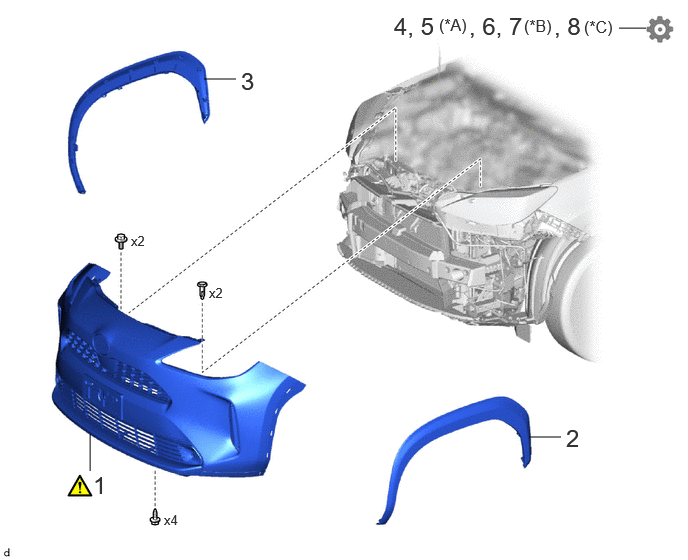
| Procedure | Part Name Code | 
|

|

|
|
|---|---|---|---|---|---|
| 1 | FRONT BUMPER ASSEMBLY | - | ( ) |
- | - |
| 2 | FRONT FENDER MOULDING SUB-ASSEMBLY LH | 75602A | - | - | - |
| 3 | FRONT FENDER MOULDING SUB-ASSEMBLY RH | 75601A | - | - | - |
| 4 | ADJUST HEADLIGHT AIMING | - | - | - | ()
|
| 5 | ADJUST FOG LIGHT AIMING | - | - | - | ()
|
| 6 | ADJUST MILLIMETER WAVE RADAR SENSOR | - | - | - | ()
|
| 7 | PERFORM CALIBRATION | - | - | - | ()
|
| 8 | PERFORM CALIBRATION | - | - | - | ()
|
| *A | w/ Fog Light | *B | w/ Parking Support Brake System |
| *C | w/ Panoramic View Monitor System | - | - |
PROCEDURE

 1.INSTALL FRONT BUMPER ASSEMBLY
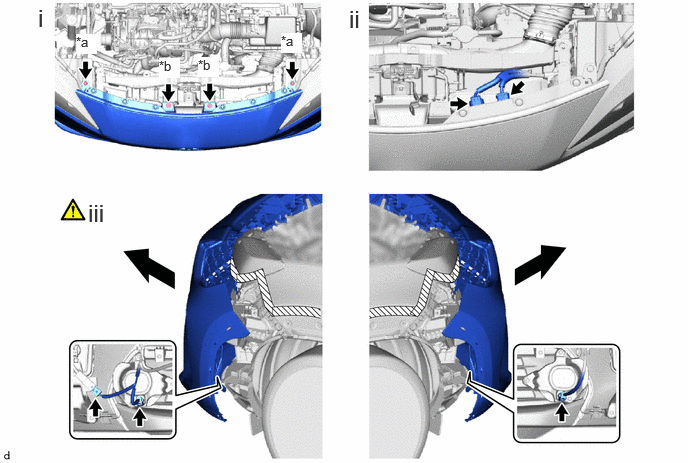
| *a | Clip | *b | Bolt |
Install the front bumper assembly with 2 clips and 2 bolts.
Connect the 2 connectors.
Pull back the side of the front bumper assembly to disconnect the 3 connectors.
- NOTICE:
-
Do not apply excessive force when pulling back the front bumper assembly.
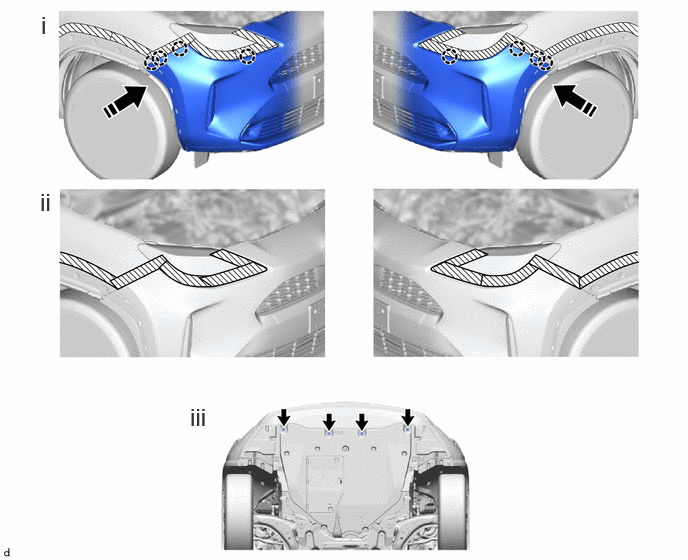

|
Install in this Direction | - | - |
Engage the claws as shown in the illustration.
Remove the protective tape.
Install the 4 screws.
75602A
2.INSTALL FRONT FENDER MOULDING SUB-ASSEMBLY LH
75601A
3.INSTALL FRONT FENDER MOULDING SUB-ASSEMBLY RH
4.ADJUST HEADLIGHT AIMING
for Halogen Headlight:
Click hereVehicle Exterior>LIGHTING (EXT)>HEADLIGHT ASSEMBLY (for Halogen Headlight)>ADJUSTMENT
for LED Headlight:
Click hereVehicle Exterior>LIGHTING (EXT)>HEADLIGHT ASSEMBLY (for LED Headlight)>ADJUSTMENT
5.ADJUST FOG LIGHT AIMING (w/ Fog Light)
88211B
6.ADJUST MILLIMETER WAVE RADAR SENSOR ASSEMBLY
When the millimeter wave radar sensor assembly is replaced with a new one, adjustment of the radar sensor beam axis must be performed.
- HINT:
-
Millimeter wave radar sensor assembly Learning can be performed by using either Triangle Target or Flat Surface Target or Driving Adjustment.
- ·
Triangle Target:
·Flat Surface Target:
·Driving Adjustment:
Click hereADAS / AD>ADVANCED DRIVER ASSISTANCE SYSTEM>MILLIMETER WAVE RADAR SENSOR>DRIVING ADJUSTMENT
7.PERFORM CALIBRATION (w/ Parking Support Brake System)
w/o Advanced Park:
Click hereAudio / Visual / Telematics>PARK ASSIST / MONITORING>PARKING SUPPORT BRAKE SYSTEM>CALIBRATION
w/ Advanced Park:
8.PERFORM CALIBRATION (w/ Panoramic View Monitor System)
w/o Advanced Park: