DOOR LOCK REAR DOOR LOCK INSTALLATION
CAUTION / NOTICE / HINT
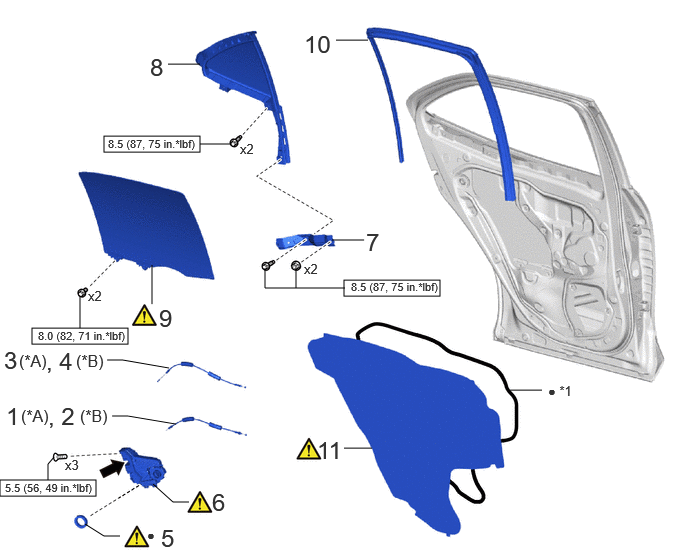
| Procedure | Part Name Code | 
|

|

|
|
|---|---|---|---|---|---|
| 1 | REAR DOOR INSIDE LOCKING CABLE ASSEMBLY | 69780E | - | - | - |
| 2 | REAR DOOR INSIDE LOCKING CABLE ASSEMBLY | 49780B | - | - | - |
| 3 | REAR DOOR LOCK REMOTE CONTROL CABLE ASSEMBLY | 69730M | - | - | - |
| 4 | REAR DOOR LOCK REMOTE CONTROL CABLE ASSEMBLY | 69730M | - | - | - |
| 5 | DOOR LOCK WIRING HARNESS SEAL | 69318C | ( ) |
- | - |
| 6 | REAR DOOR LOCK ASSEMBLY | 69060A | ()
|
- | - |
| 7 | REAR DOOR WINDOW GUIDE PLATE LOWER | 67447C | - | - | - |
| 8 | REAR DOOR QUARTER WINDOW GLASS SUB-ASSEMBLY | 68012 | - | - | - |
| 9 | REAR DOOR GLASS SUB-ASSEMBLY | 68104 | ()
|
- | - |
| 10 | REAR DOOR GLASS RUN | 68152C | - | - | - |
| 11 | REAR DOOR SERVICE HOLE COVER | 67842E | ()
|
- | - |
| *A | w/o Double Locking System | *B | w/ Double Locking System |
| *1 | BUTYL TAPE | - | - |

|
N*m (kgf*cm, ft.*lbf): Specified torque | ● | Non-reusable part |

|
MP grease | - | - |
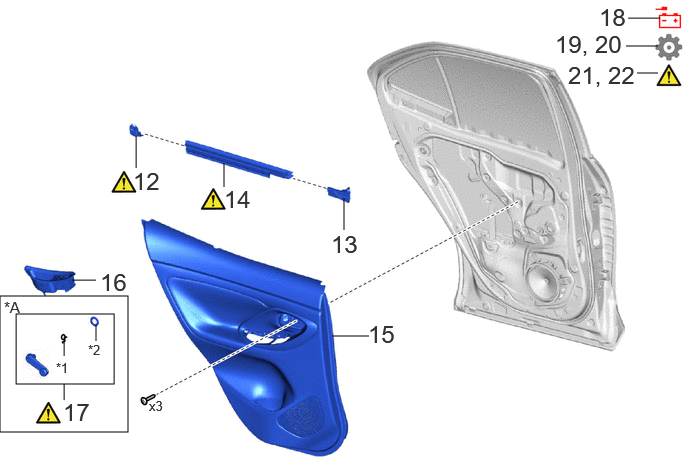
| Procedure | Part Name Code |
|
|
|
|
|---|---|---|---|---|---|
| 12 | REAR DOOR BELT REAR SEAL | 68199 | ()
|
- | - |
| 13 | REAR DOOR BELT FRONT SEAL | 68197A | - | - | - |
| 14 | REAR DOOR GLASS INNER WEATHERSTRIP | 68174A | ()
|
- | - |
| 15 | REAR DOOR TRIM BOARD SUB-ASSEMBLY | 67604 | - | - | - |
| 16 | REAR POWER WINDOW REGULATOR SWITCH ASSEMBLY WITH REAR DOOR ARMREST BASE UPPER PANEL | - | - | - | - |
| 17 | REAR DOOR WINDOW REGULATOR HANDLE ASSEMBLY | 69260E | ()
|
- | - |
| 18 | CONNECT CABLE FROM NEGATIVE AUXILIARY BATTERY TERMINAL | - | - | - | - |
| 19 | INITIALIZATION AFTER RECONNECTING AUXILIARY BATTERY TERMINAL | - | - | - | ()
|
| 20 | INITIALIZE POWER WINDOW CONTROL SYSTEM | - | - | - | ()
|
| 21 | INSPECT POWER WINDOW OPERATION | - | ()
|
- | - |
| 22 | CHECK POWER DOOR LOCK CONTROL SYSTEM | - | ()
|
- | - |
| *A | w/o Power Window | - | - |
| *1 | SHAFT SNAP RING | *2 | WINDOW REGULATOR HANDLE PLATE |
CAUTION / NOTICE / HINT
- HINT:
- ·
Use the same procedure for the LH side and RH side.
·The following procedure is for the RH side.
PROCEDURE

 69780E
1.INSTALL REAR DOOR INSIDE LOCKING CABLE ASSEMBLY (w/o Double Locking System)
69780E
2.INSTALL REAR DOOR INSIDE LOCKING CABLE ASSEMBLY (w/ Double Locking System)
69730M
3.INSTALL REAR DOOR LOCK REMOTE CONTROL CABLE ASSEMBLY (w/o Double Locking System)
69730M
4.INSTALL REAR DOOR LOCK REMOTE CONTROL CABLE ASSEMBLY (w/ Double Locking System)
69318C
5.INSTALL DOOR LOCK WIRING HARNESS SEAL
|
|
When reusing the rear door lock with motor assembly:
Install a new door lock wiring harness seal to the rear door lock with motor assembly. |

69060A
6.INSTALL REAR DOOR LOCK ASSEMBLY
|
|
|
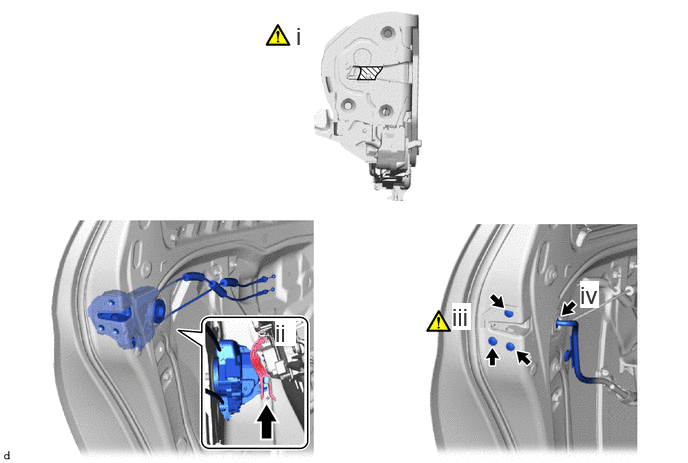

|
MP grease | - | - |
Apply MP grease to the sliding parts of the rear door lock assembly.
When reusing the rear door lock assembly:
1. Install a new door lock wiring harness seal to the rear door lock assembly.
Connect the rear door lock assembly to the release plate of the rear door outside handle frame sub-assembly as shown in the illustration, and set it to the rear door panel.
- HINT:
-
Make sure that the release plate of the rear door outside handle frame sub-assembly is securely connected to the rear door lock assembly.
Using a T30 "TORX" socket wrench, install the rear door lock assembly with the 3 screws.
- Torque:
- 5.5 N*m (56 kgf*cm, 49 in.*lbf)
Connect the connector.
67447C
7.INSTALL REAR DOOR WINDOW GUIDE PLATE LOWER
68012
8.INSTALL REAR DOOR QUARTER WINDOW GLASS SUB-ASSEMBLY
68104
9.INSTALL REAR DOOR GLASS SUB-ASSEMBLY
|
|
Click here()
|
68152C
10.INSTALL REAR DOOR GLASS RUN
67842E
11.INSTALL REAR DOOR SERVICE HOLE COVER LH
|
|
Click here()
|
68199
12.INSTALL REAR DOOR BELT REAR SEAL
|
|
Click here()
|
68197A
13.INSTALL REAR DOOR BELT FRONT SEAL
68174A
14.INSTALL REAR DOOR GLASS INNER WEATHERSTRIP
|
|
Click here()
|
67604
15.INSTALL REAR DOOR TRIM BOARD SUB-ASSEMBLY
16.INSTALL REAR POWER WINDOW REGULATOR SWITCH ASSEMBLY WITH REAR DOOR ARMREST BASE UPPER PANEL
69260E
17.INSTALL REAR DOOR WINDOW REGULATOR HANDLE ASSEMBLY (w/o Power Window)
|
|
Click here()
|
18.CONNECT CABLE FROM NEGATIVE AUXILIARY BATTERY TERMINAL
for M15A-FKS:
Click hereGeneral>MAINTENANCE>M15A-FKS AUXILIARY BATTERY>INSTALLATION
for M15A-FXE:
Click hereGeneral>MAINTENANCE>M15A-FXE AUXILIARY BATTERY>INSTALLATION
19. INITIALIZATION AFTER RECONNECTING AUXILIARY BATTERY TERMINAL
Click hereGeneral>SETUP>WHEN DISCONNECTING OR RECONNECTING BATTERY TERMINAL>WORK PROCEDURE
- HINT:
-
When disconnecting and reconnecting the auxiliary battery, there is an automatic learning function that completes learning when the respective system is used.
-
Click hereGeneral>SETUP>WHEN DISCONNECTING OR RECONNECTING BATTERY TERMINAL>AUTOMATIC LEARNING CHART
20. INITIALIZE POWER WINDOW CONTROL SYSTEM
21.INSPECT POWER WINDOW OPERATION
|
|
Click here()
|
22.CHECK POWER DOOR LOCK CONTROL SYSTEM
|
|
Click here()
|