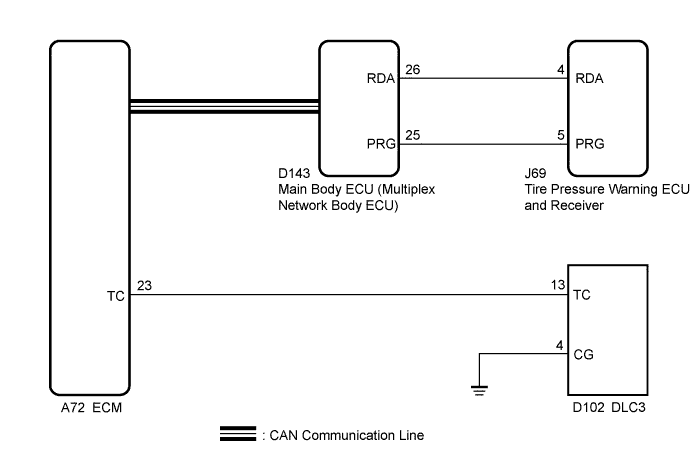
TIRE PRESSURE WARNING SYSTEM (for Hatchback) > TC and CG Terminal Circuit |
| 1.CHECK CAN COMMUNICATION SYSTEM |
Check if a CAN communication system DTC is output (Click here).
| Result | Proceed to |
| DTCs is not output | A |
| DTCs is output | B |
|
| ||||
| A | |
 |
| 2.CHECK DTC (C2179/79) |
Check if DTC C2179/79 is output (Click here).
| Result | Proceed to |
| DTC C2179/79 is not output. | A |
| DTC C2179/79 is output. | B |
|
| ||||
| A | |
|
| 3.CHECK HARNESS AND CONNECTOR (TC of DLC3 - ECM) |
Disconnect the ECM connector.
Measure the resistance according to the value(s) in the table below.
| Tester Connection | Condition | Specified Condition |
| D102-13 (TC) - A72-23 (TC) | Always | Below 1 Ω |
| D102-13 (TC) - Body ground | Always | 10 kΩ or higher |
|
| ||||
| OK | |
|
| 4.CHECK HARNESS AND CONNECTOR (CG of DLC3 - BODY GROUND) |
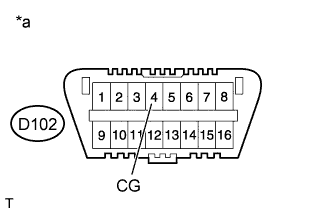 |
Measure the resistance according to the value(s) in the table below.
| Tester Connection | Condition | Specified Condition |
| D102-4 (CG) - Body ground | Always | Below 1 Ω |
| *a | Front view of DLC3 |
|
| ||||
| OK | |
|
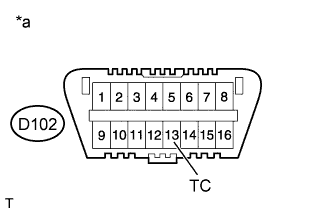
| 5.INSPECT DLC3 (TC VOLTAGE) |
 |
Connect the ECM connector.
Measure the voltage according to the value(s) in the table below.
| Tester Connection | Switch Condition | Specified Condition |
| D102-13 (TC) - D102-4 (CG) | Ignition switch ON | 11 to 14 V |
| *a | Front view of DLC3 |
|
| ||||
| OK | ||
 | ||
| ||
