PARKING BRAKE PARKING BRAKE SYSTEM(w/o Electric Parking Brake) ADJUSTMENT
PROCEDURE

 1.INSPECT PARKING BRAKE LEVER TRAVEL
Slowly pull the parking brake lever to the fully applied position, counting the number of clicks.
- Parking Brake Lever Travel at 200 N (20 kgf, 45 lbf):
5 to 8 clicks
58911A
2.REMOVE NO. 1 BOX SIDE PANEL (for TMC Made)
58912C
3.REMOVE NO. 2 BOX SIDE PANEL (for TMC Made)
58903A
4.REMOVE CONSOLE REAR END PANEL SUB-ASSEMBLY (for TMC Made)
58857A
5.REMOVE UPPER NO. 1 CONSOLE SUPPORT BRACKET (for TMC Made)
58903A
6.REMOVE CONSOLE REAR END PANEL SUB-ASSEMBLY (for Gasoline Model TMMF Made)
58911A
7.REMOVE NO. 1 BOX SIDE PANEL (for HV Model TMMF Made)
58912C
8.REMOVE NO. 2 BOX SIDE PANEL (for HV Model TMMF Made)
58857A
9.REMOVE UPPER NO. 1 CONSOLE SUPPORT BRACKET (for HV Model TMMF Made)
10.ADJUST PARKING BRAKE LEVER TRAVEL
Completely release the parking brake lever.
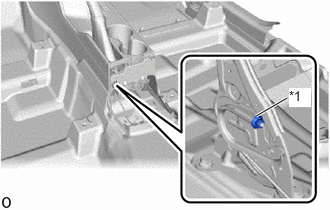
| *1 | No. 1 Wire Adjusting Nut |
Turn the No. 1 wire adjusting nut until the parking brake lever travel is corrected to within the specified range.
- Parking brake lever travel at 200 N (20 kgf, 45 lbf):
5 to 8 clicks
- NOTICE:
-
If the lock nut has been removed from the rod, replace the No. 1 wire adjusting nut with a new one.
Operate the parking brake lever 3 to 4 times, and check the parking brake lever travel.
Check whether the parking brake drags or not.
58857A
11.INSTALL UPPER NO. 1 CONSOLE SUPPORT BRACKET (for TMC Made)
58903A
12.INSTALL CONSOLE REAR END PANEL SUB-ASSEMBLY (for TMC Made)
58911A
13.INSTALL NO. 1 BOX SIDE PANEL (for TMC Made)
58912C
14.INSTALL NO. 2 BOX SIDE PANEL (for TMC Made)
58903A
15.INSTALL CONSOLE REAR END PANEL SUB-ASSEMBLY (for Gasoline Model TMMF Made)
58857A
16.INSTALL UPPER NO. 1 CONSOLE SUPPORT BRACKET (for HV Model TMMF Made)
58912C
17.INSTALL NO. 2 BOX SIDE PANEL (for HV Model TMMF Made)
58911A
18.INSTALL NO. 1 BOX SIDE PANEL (for HV Model TMMF Made)
19.INSPECT BRAKE WARNING LIGHT
When operating the parking brake lever, check that the brake warning light illuminates.
- OK:
Brake warning light always illuminates at the first click.