AUDIO / VIDEO AUDIO AND VISUAL SYSTEM(for Radio and Display Type without TAS Type) B157D DAB Tuner Antenna Disconnected
DESCRIPTION
This DTC is stored when a malfunction occurs in the digital audio broadcasting antenna assembly which is connected to the radio and display receiver assembly.
| DTC No. | Detection Item | DTC Detection Condition | Trouble Area |
|---|---|---|---|
| B157D | DAB Tuner Antenna Disconnected | The digital audio broadcasting antenna assembly is not connected | ·
Window shield glass (window glass antenna wire) (except G16E-GTS) ·
Quarter window assembly RH (window glass antenna wire)(for G16E-GTS) ·
No. 5 antenna cord sub-assembly (except G16E-GTS) ·
No. 4 antenna cord sub-assembly (except G16E-GTS) ·
No. 2 antenna cord sub-assembly ·
Antenna cord sub-assembly ·
Digital audio broadcasting antenna base ·
Radio and display receiver assembly |
PROCEDURE
Clear the DTCs.
- Body Electrical > Navigation System > Clear DTCs
- 50002 212
- Result:
Proceed to NEXT
NEXT
Check for DTCs.
- Body Electrical > Navigation System > Trouble Codes
- 50001 212
- Result:
Result Proceed to DTCs are output A DTCs are not output B
A
B
Click hereGeneral>INTRODUCTION>HOW TO TROUBLESHOOT ECU CONTROLLED SYSTEMS>HOW TO PROCEED WITH TROUBLESHOOTING
Check if any optional components that may decrease reception capacity, such as a telephone antenna, are installed.
- OK:
Optional components are installed.
- NOTICE:
-
Do not remove optional components without permission of the customer.
- Result:
Proceed to OK NG
OK
NG
Choose the model to be inspected.
- Result:
Result Proceed to except G16E-GTS A for G16E-GTS B
A
B
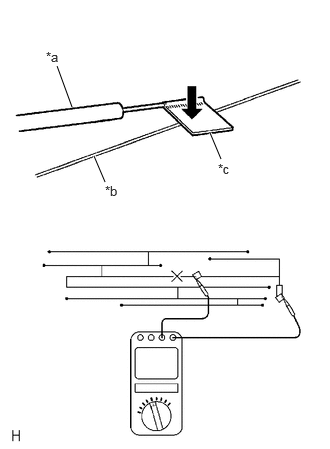
| *a | Tester Probe |
| *b | Antenna Wire |
| *c | Tin Foil |
Check for continuity in the window glass antenna wire.
- NOTICE:
-
When cleaning the glass, wipe it in the direction of the wire with a soft dry cloth. Take care not to damage the wire. Do not use detergents or glass cleaners with abrasive ingredients. When measuring resistance, wrap a piece of tin foil around the tip of each probe and press the foil against the wire with your finger as shown in the illustration.
- HINT:
-
Check for continuity at the center of each antenna wire as shown in the illustration.
- OK:
There is continuity in the window glass antenna wire.
- Result:
Proceed to OK NG
OK
NG
Clear the DTCs.
- Body Electrical > Navigation System > Clear DTCs
- 50002 212
- Result:
Proceed to NEXT
NEXT
Replace the antenna cord sub-assembly with a new or known good one.
Click hereAudio / Visual / Telematics>AUDIO / VIDEO>RADIO ANTENNA CORD>REMOVAL
Check for DTCs.
- Body Electrical > Navigation System > Trouble Codes
- 50001 212
- Result:
Result Proceed to DTCs are output A DTCs are not output B
A
B
Clear the DTCs.
- Body Electrical > Navigation System > Clear DTCs
- 50002 212
- Result:
Proceed to NEXT
NEXT
Replace the No. 2 antenna cord sub-assembly with a new or known good one.
Click hereAudio / Visual / Telematics>AUDIO / VIDEO>RADIO ANTENNA CORD>REMOVAL
Check for DTCs.
- Body Electrical > Navigation System > Trouble Codes
- 50001 212
- Result:
Result Proceed to DTCs are output A DTCs are not output B
A
B
Clear the DTCs.
- Body Electrical > Navigation System > Clear DTCs
- 50002 212
- Result:
Proceed to NEXT
NEXT
Replace the No. 4 antenna cord sub-assembly with a new or known good one.
Click hereAudio / Visual / Telematics>AUDIO / VIDEO>RADIO ANTENNA CORD>REMOVAL
Check for DTCs.
- Body Electrical > Navigation System > Trouble Codes
- 50001 212
- Result:
Result Proceed to DTCs are output A DTCs are not output B
A
B
Clear the DTCs.
- Body Electrical > Navigation System > Clear DTCs
- 50002 212
- Result:
Proceed to NEXT
NEXT
Replace the No. 5 antenna cord sub-assembly with a new or known good one.
Click hereAudio / Visual / Telematics>AUDIO / VIDEO>RADIO ANTENNA CORD>REMOVAL
Check for DTCs.
- Body Electrical > Navigation System > Trouble Codes
- 50001 212
- Result:
Result Proceed to DTCs are output A DTCs are not output B
A
B
Clear the DTCs.
- Body Electrical > Navigation System > Clear DTCs
- 50002 212
- Result:
Proceed to NEXT
NEXT
Replace the digital audio broadcasting antenna base with a new or known good one.
Click hereAudio / Visual / Telematics>AUDIO / VIDEO>DIGITAL AUDIO BROADCASTING ANTENNA (for 5 Door)>REMOVAL
Check for DTCs.
- Body Electrical > Navigation System > Trouble Codes
- 50001 212
- Result:
Result Proceed to DTCs are output A DTCs are not output B
A
B
| *a | Tester Probe |
| *b | Antenna Wire |
| *c | Tin Foil |
Check for continuity in the window glass antenna wire.
- NOTICE:
-
When cleaning the glass, wipe it in the direction of the wire with a soft dry cloth. Take care not to damage the wire. Do not use detergents or glass cleaners with abrasive ingredients. When measuring resistance, wrap a piece of tin foil around the tip of each probe and press the foil against the wire with your finger as shown in the illustration.
- HINT:
-
Check for continuity at the center of each antenna wire as shown in the illustration.
- OK:
There is continuity in the window glass antenna wire.
- Result:
Proceed to OK NG
OK
NG
Clear the DTCs.
- Body Electrical > Navigation System > Clear DTCs
- 50002 212
- Result:
Proceed to NEXT
NEXT
Replace the antenna cord sub-assembly with a new or known good one.
Click hereAudio / Visual / Telematics>AUDIO / VIDEO>RADIO ANTENNA CORD>REMOVAL
Check for DTCs.
- Body Electrical > Navigation System > Trouble Codes
- 50001 212
- Result:
Result Proceed to DTCs are output A DTCs are not output B
A
B
Clear the DTCs.
- Body Electrical > Navigation System > Clear DTCs
- 50002 212
- Result:
Proceed to NEXT
NEXT
Replace the No. 2 antenna cord sub-assembly with a new or known good one.
Click hereAudio / Visual / Telematics>AUDIO / VIDEO>RADIO ANTENNA CORD>REMOVAL
Check for DTCs.
- Body Electrical > Navigation System > Trouble Codes
- 50001 212
- Result:
Result Proceed to DTCs are output A DTCs are not output B
A
B
Clear the DTCs.
- Body Electrical > Navigation System > Clear DTCs
- 50002 212
- Result:
Proceed to NEXT
NEXT
Replace the digital audio broadcasting antenna base with a new or known good one.
Click hereAudio / Visual / Telematics>AUDIO / VIDEO>DIGITAL AUDIO BROADCASTING ANTENNA (for 3 Door)>REMOVAL
Check for DTCs.
- Body Electrical > Navigation System > Trouble Codes
- 50001 212
- Result:
Result Proceed to DTCs are output A DTCs are not output B
A
B