CHECK MODE PROCEDURE
Troubleshooting · Vehicles built from Aug 2005
| PANEL DIAGNOSIS (INDICATOR CHECK) |
Turn the ignition switch off.
Turn the ignition switch on (IG) while simultaneously pressing the A/C control AUTO switch and the REC/FRS switch.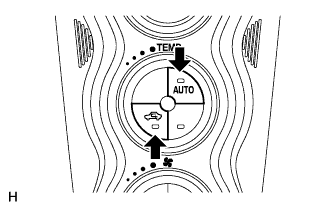

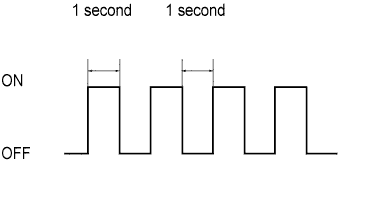
Check that all indicators and the display area are turned on and off 4 times in succession at 1 second intervals.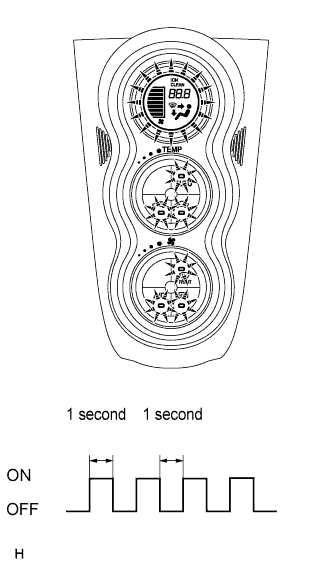
- HINT:
- After the indicator check is completed, the system automatically enters sensor check mode.
Press the OFF switch to terminate the panel diagnosis.
| PANEL DIAGNOSIS (SENSOR CHECK) |
Perform the indicator check.
- HINT:
- After the indicator check is completed, the system automatically enters sensor check mode.
Press the REC/FRS switch to enter actuator check mode.
After the actuator check is completed, press the AUTO switch to enter sensor check mode.
- NOTICE:
- The sensor check must be performed again after the actuator check is completed because sensor check mode, which starts automatically after the indicator check, cannot fully detect malfunctions.
Check the sensor check results displayed on the set temperature display.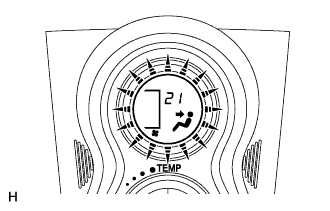
Results
Code Display
Present malfunction
Blinks
Past malfunction
Blinks
- HINT:
- The illustration on the left shows the display when code 21 is output.
- When two or more sensor check codes are detected, the codes are displayed in ascending numerical order.
- In cases with two or more codes, making them difficult to read, press the MODE switch to activate the step operation and display them one by one.
- The codes are displayed in ascending numerical order as the MODE switch is pressed.
- The illustration on the left shows the display when code 21 is output.
When any sensor check codes are displayed, refer to the DTC chart (Click here).
Press the OFF switch to terminate the panel diagnosis.
- HINT:
- Pressing the REC/FRS switch returns to actuator check mode.
| PANEL DIAGNOSIS (CLEAR SENSOR CHECK CODE) |
Inspect, and repair or replace the malfunctioning parts.
Clear the sensor check codes.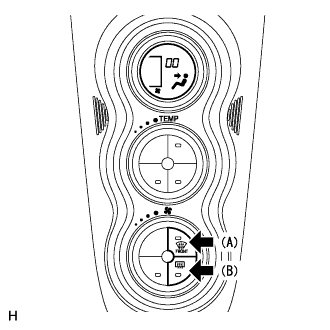
While pressing the DEF switch during sensor check mode, press the Rr DEF switch.
- HINT:
- Sensor check codes can be cleared by removing the A/C fuse of the main body ECU within 1 hour of the ignition switch being turned off.
Perform the sensor check and confirm that normal code 00 is displayed.
| PANEL DIAGNOSIS (ACTUATOR CHECK) |
 |
Start the engine and warm it up.
Perform the indicator check.
When the sensor check is started after the indicator check, press the REC/FRS switch to start the actuator check.
- HINT:
- Perform the actuator check with the engine running.
Check the temperature and blower levels by hand at each step while the actuator check proceeds from step 0 to 9 at 1 second intervals (continuous operation).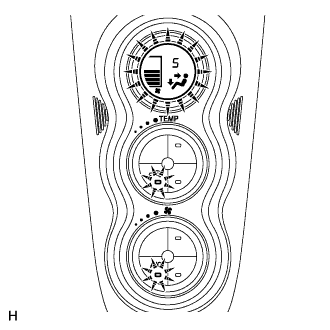
- HINT:
- Each step number is displayed on the set temperature display.
To display step numbers one by one manually, press the MODE switch to activate the step operation. The step number changes each time the MODE switch is pressed.
- HINT:
- Each step number blinks at 1 second intervals during the step operation.
- The illustration on the left shows the display when step number 5 is displayed.
- Each step number blinks at 1 second intervals during the step operation.
Press the OFF switch to terminate the panel diagnosis.
- HINT:
- Pressing the AUTO switch returns to sensor check mode.
Step No.
Blower Lever
Air Mix Damper
Air Flow Vent
Air Inlet Damper
Cool Air Bypass
Compressor
0
0
0 %
(MAX COLD)
FACE
FRS
-
OFF
1
1
0 %
(MAX COLD)
FACE
FRS
-
OFF
2
17
0 %
(MAX COLD)
FACE
REC/FRS
-
ON
3
17
0 %
(MAX COLD)
FACE
REC
-
ON
4
17
50 %
FACE/FOOT
REC
-
ON
5
17
50 %
FACE/FOOT
REC
-
ON
6
17
50 %
FOOT
FRS
-
ON
7
17
100 %
(MAX HOT)
FOOT
FRS
-
ON
8
17
100 %
(MAX HOT)
FOOT/DEF
FRS
-
ON
9
31
100 %
(MAX HOT)
DEF
FRS
-
ON