Display does not Dim when Light Control Switch is Turned ON
Circuit diagnosis
INSPECTION PROCEDURE
| 1. CHECK IMAGE QUALITY SETTING |

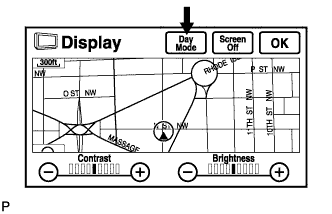  |
Enter the display adjustment screen by pressing the "DISP" switch.
Turn the light control switch to the TAIL position.
Check if "DAY MODE" on the display is ON.
- OK:
- "DAY MODE" is ON.
|
|
||||

| OK | ||
 |
||
| ||
| 2. CHECK VEHICLE SIGNAL (DISPLAY CHECK MODE) |
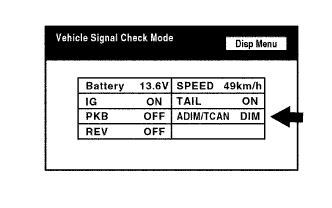 |
Enter the "Display Check" mode (Vehicle Signal Check) (Click here).
Check that the display changes between DIM and BRIGHT according to the light control switch operation.
- OK:
Light Control Switch
Display
TAIL or HEAD
DIM
OFF
BRIGHT
- HINT:
- The display is updated once per second. It is normal for the display to lag behind the actual switch operation.
|
|
||||

| OK | ||
|
||
| ||