| Last Modified: 11-27-2007 | 1.6 A | |
| Service Category: Audio/Visual/Telematics | Section: Audio/Video | |
| Model Year: 2008 | Model: LX570 | Doc ID: RM000000VEL00KX |
| Title: AUDIO / VIDEO: INSTRUMENT PANEL SPEAKER: INSTALLATION (2008 LX570) | ||
INSTALLATION
HINT:
- Use the same procedures for the LH side and RH side.
- The procedures listed below are for the LH side.
-
A bolt without a torque specification is shown in the standard bolt chart
 .
.
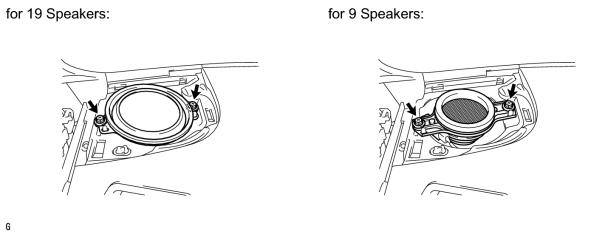
1. INSTALL FRONT NO. 2 SPEAKER ASSEMBLY
(a) Connect the connector.
(b) Temporarily install the speaker by aligning speaker with the positioning pins of the instrument panel.
(c) Install the speaker with the 2 bolts.
NOTICE:
- Do not touch the cone part of the speaker.
- When installing the speaker to the instrument panel, be careful that the wires do not get caught between parts.
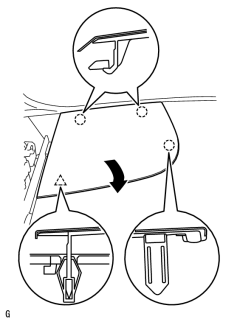
2. INSTALL NO. 1 INSTRUMENT PANEL SPEAKER PANEL SUB-ASSEMBLY
|
(a) Hook the 2 claws on the far side to the instrument panel to attach them. Then, lower the panel towards the rear of the vehicle in the direction of the arrow, and attach the claw and clip on the front side to install the panel. |
3. INSTALL FRONT PILLAR GARNISH LH
4. INSTALL FRONT ASSIST GRIP SUB-ASSEMBLY
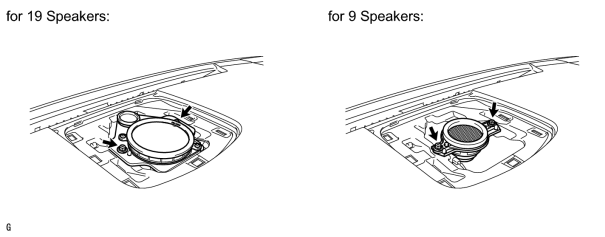
5. INSTALL FRONT NO. 4 SPEAKER ASSEMBLY
(a) Connect the speaker connector.
(b) Temporarily install the speaker by aligning speaker with the positioning pins of the instrument panel.
(c) Install the speaker with the 2 bolts.
NOTICE:
- Do not touch the cone part of the speaker.
- When installing the speaker to the instrument panel, be careful that the wires do not get caught between parts.
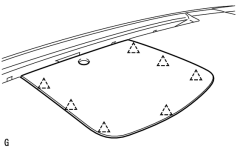
6. INSTALL NO. 1 SPEAKER OPENING COVER ASSEMBLY
|
(a) Attach the 7 clips to install the opening cover. |
7. INSTALL MULTI-DISPLAY ASSEMBLY WITH BRACKET (w/o Navigation System)
8. INSTALL DISPLAY AND NAVIGATION MODULE DISPLAY WITH BRACKET (w/ Navigation System)
9. INSTALL NO. 4 INSTRUMENT PANEL REGISTER ASSEMBLY
10. INSTALL NO. 3 INSTRUMENT PANEL REGISTER ASSEMBLY
11. CONNECT CABLE TO NEGATIVE BATTERY TERMINAL
NOTICE:
When disconnecting the cable, some systems need to be initialized after the cable is reconnected
.
12. INSTALL ENGINE ROOM SIDE COVER LH

|

|