RM1440E
_56
Audio / Visual / Telematics
_056150
AUDIO / VIDEO
_0274031
INSTRUMENT PANEL SPEAKER
A
AUDIO / VIDEO INSTRUMENT PANEL SPEAKER REMOVAL
CAUTION / NOTICE / HINT
- HINT:
- ·
Use the same procedure for both the RH and LH sides.
·The procedure listed below is for the LH side.
PROCEDURE

 62212
1.REMOVE FRONT PILLAR GARNISH LH
55408F
2.REMOVE NO. 1 INSTRUMENT PANEL SPEAKER PANEL SUB-ASSEMBLY
86160P
3.REMOVE FRONT NO. 2 SPEAKER ASSEMBLY
a.
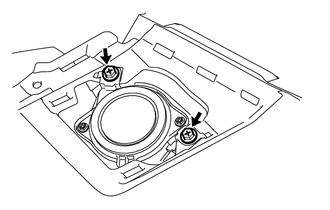
Remove the 2 screws.
b.
Disconnect the connector to remove the front No. 2 speaker assembly.
- NOTICE:
-
Do not touch the cone of the front No. 2 speaker assembly.
86161D
4.REMOVE NO. 1 SPEAKER MOUNTING BRACKET
a.
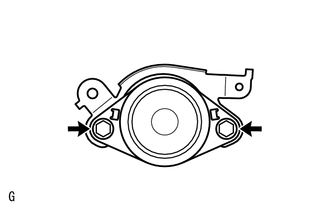
Remove the 2 bolts and No. 1 speaker mounting bracket.