 |
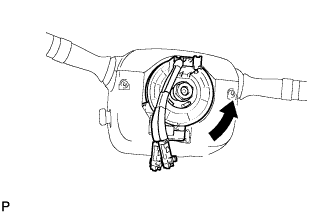
Rotate the spiral cable counterclockwise slowly by hand until it feels firm.
- CAUTION:
- Do not turn the spiral cable by the airbag wire harness.
STEERING ANGLE SENSOR > INSTALLATION |
| 1. INSTALL SPIRAL CABLE WITH STEERING ANGLE SENSOR |
Install the spiral cable with steering angle sensor .
| 2. INSTALL UPPER STEERING COLUMN COVER |
Attach the claw to install the steering column upper cover.
Attach the 4 clips to install the steering column upper cover to the instrument cluster finish panel.
| 3. INSTALL LOWER STEERING COLUMN COVER |
Attach the 2 claws to install the steering column lower cover.
Install the 2 screws.
| 4. ADJUST SPIRAL CABLE |
Turn the ignition switch off.
Disconnect the cable from the negative (-) battery terminal.
|
Rotate the spiral cable counterclockwise slowly by hand until it feels firm.
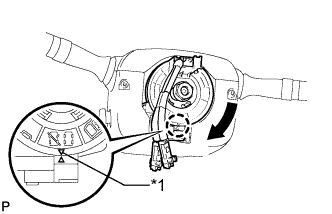 |
Rotate the spiral cable clockwise approximately 2.5 turns to align the marks.
| *1 | Mark |
| 5. INSTALL STEERING WHEEL ASSEMBLY |
Install the steering wheel assembly (Click here).
| 6. CONNECT CABLE TO NEGATIVE BATTERY TERMINAL |
| 7. CHECK SRS WARNING LIGHT |
Check the SRS warning light (Click here).