2NR-VE ENGINE CONTROL SFI SYSTEM(w/ Air Fuel Ratio Sensor) Brake Override System
DESCRIPTION
When the vehicle is being driven with the accelerator pedal depressed, depressing the brake pedal without releasing the accelerator pedal will activate the brake override system to restrict driving torque. The conditions for activating the brake override system as well as the items that are controlled are explained below.
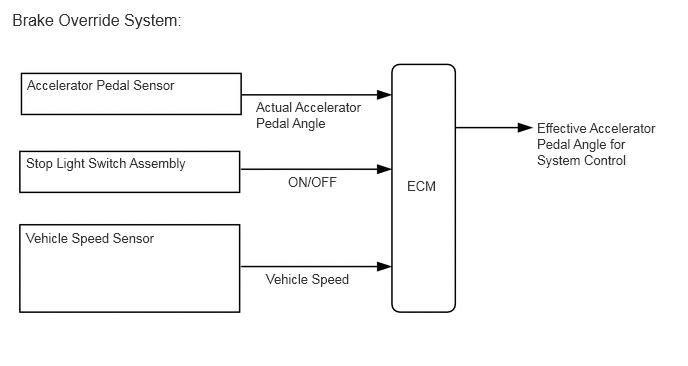
- Activation Conditions:
- ·
Vehicle is running at or above the specified speed.
·The accelerator pedal is depressed beyond a specified level, and then the brake pedal is depressed.
- NOTICE:
-
The vehicle may not enter the brake override system control due to the relation of the accelerator pedal angle and the vehicle's speed.
- Items Controlled:
- ·
Driving torque is restricted.
- HINT:
-
During brake override system control, the value for the accelerator pedal angle (which is used for engine control) is forcibly reduced to a specified value. For this reason, the Data List value for accelerator position will be replaced with a specified value regardless of the actual accelerator pedal angle (Main accelerator position, Sub accelerator position).
- Deactivation Conditions:
- ·
When the stop light switch turns off or the actual accelerator pedal angle decreases beyond the specified range.
CAUTION / NOTICE / HINT
- Inspection Method
-
Example:
-
Drive at 10 km/h (6.25 mph), depress the accelerator pedal by 1/2 to 3/4 and keep it in that position. Under these conditions, if the engine speed decreases to 1200 to 1000 rpm when the brake pedal is depressed, then the brake override system has been activated.
- CAUTION:
-
When carrying out the inspection, use a place where you are able to carry it out safely and also pay close attention to your surroundings.
-
Also, when driving make absolutely sure that all road traffic laws, such as speed limits, are observed.
- HINT:
- ·
Under normal conditions, the accelerator position value changes in response to the Main accelerator position. For more information on the numerical values, refer to the Data List.
·If the Data List values of Main accelerator position do not match, and the value of accelerator position changes but the value of Main accelerator position is constant, this confirms that brake override system has activated. (Data can be captured relatively easily by using the snapshot function in the Data List. Confirm the data after performing the drive test.)
- NOTICE:
-
The brake override system restricts driving torque if the brake pedal is depressed when driving with the accelerator pedal depressed. If a customer reports experiencing loss of torque after the accelerator and brake pedals have both been intentionally depressed, explain to the customer that this is not a malfunction, and that the customer should avoid depressing both the accelerator and brake pedals at the same time.
-
Example: While operating the accelerator pedal, the customer uses their left foot to operate the brake pedal.
PROCEDURE
Connect the GTS or Techstream to the DLC3.
Turn the ignition switch to ON.
Turn the GTS or Techstream on.
Enter the following menus: System Select / Health Check.
Check the DTCs.
- Result:
Result Proceed to DTCs are not output A DTCs are output B
A
B
Connect the GTS or Techstream to the DLC3.
Turn the ignition switch to ON.
Turn the GTS or Techstream on.
Enter the following menus: Powertrain / EFI / Data List / Stop lamp SW.
Check the Data List indication when the brake pedal is depressed and released.
- OK:
GTS or Techstream Display Condition Specified Condition Stop lamp SW Brake pedal released OFF Brake pedal depressed ON
- Result:
Proceed to OK NG
OK
NG
Inspect and adjust the brake pedal support sub-assembly.
for RHD
Click hereBrake>BRAKE SYSTEM (OTHER)>BRAKE PEDAL(for RHD)>ADJUSTMENT
for LHD
Click hereBrake>BRAKE SYSTEM (OTHER)>2NR-VE BRAKE PEDAL(for LHD)>ADJUSTMENT
- HINT:
-
If the stop light switch assembly turns on too late, the start of brake override system control may be delayed; if it turns ON too soon, brake override system control may begin too early, so conduct inspection of the brake pedal support sub-assembly and stop light switch assembly.
- Result:
Result Proceed to OK A NG (for RHD) B NG (for LHD) C
A
B
C
Connect the GTS or Techstream to the DLC3.
Turn the ignition switch to ON.
Turn the GTS or Techstream on.
Enter the following menus: Powertrain / EFI / Data List / Main accelerator position and Sub accelerator position.
Read the value displayed on the GTS or Techstream.
- OK:
GTS or Techstream Display Condition Specified Condition Main accelerator position Accelerator Pedal
Released → Depressed → ReleasedValues smoothly change following accelerator pedal operation Sub accelerator position
- HINT:
-
For numerical values of Main accelerator position and Sub accelerator position, refer to the Data List.
- Result:
Proceed to OK NG
OK
NG
Connect the GTS or Techstream to the DLC3.
Start the engine.
Turn the GTS or Techstream on.
Enter the following menus: Powertrain / EFI / Data List / Vehicle speed.
Read the value displayed on the GTS or Techstream.
- Standard:
GTS or Techstream Display Condition Specified Condition Vehicle speed Vehicle stopped, engine running 0 km/h (0 mph) Vehicle being driven at constant speed between 16.1 to 64.4 km/h (10 to 40 mph) No large fluctuations when driving at a constant speed
- CAUTION:
-
When performing a driving test, obey all speed limits and traffic laws.
- HINT:
-
Data can be captured relatively easily by using the snapshot function in the Data List. Confirm the data after performing the drive test.
- Result:
Proceed to OK NG
OK
NG
Click hereVehicle Interior>METER / GAUGE / DISPLAY>METER / GAUGE SYSTEM>HOW TO PROCEED WITH TROUBLESHOOTING