CRUISE CONTROL DRIVING SUPPORT BUZZER(for RHD) REMOVAL
CAUTION / NOTICE / HINT
The necessary procedures (adjustment, calibration, initialization or registration) that must be performed after parts are removed and installed, or replaced during the driving support buzzer (pre-collision city buzzer) removal/installation are shown below.
| Replaced Part or Performed Procedure | Necessary Procedure | Effect/Inoperative Function when Necessary Procedure not Performed | Link |
|---|---|---|---|
| Disconnect cable from negative (-) battery terminal | Memorize steering angle neutral point | Panoramic view monitor system | ( ) |
- HINT:
-
When the cable is disconnected / reconnected to the battery terminal, systems temporarily stop operating. However, each system has a function that completes learning the first time the system is used.
- ·
Learning completes when vehicle is driven
Effect/Inoperative Function When Necessary Procedures are not Performed Necessary Procedures Link *1: When performing learning using the GTS
Click here(
)
Lane tracing assist system Drive the vehicle straight ahead at 35 km/h (22 mph) or more for 5 second or more. ( )
Pre-collision system Simple intelligent parking assist system*1 Parking support brake system*1
·Learning completes when vehicle is operated normally
Effect/Inoperative Function When Necessary Procedures are not Performed Necessary Procedures Link Power door lock control system
·Back door opener
Perform door unlock operation with door control switch or electrical key transmitter sub-assembly switch. ( )
Air conditioning system After the ignition switch is turned to ON, the servo motor standard position is recognized. -
PROCEDURE

 55670A
1.REMOVE INSTRUMENT PANEL CENTER REGISTER ASSEMBLY
86120
2.REMOVE RADIO RECEIVER ASSEMBLY WITH BRACKET (for Radio Receiver Type)
55521C
3.REMOVE STEREO OPENING COVER WITH BRACKET (w/ Cover)
86140A
4.REMOVE RADIO AND DISPLAY RECEIVER ASSEMBLY WITH BRACKET (for Radio and Display Type)
55085
5.REMOVE NO. 2 HEATER TO REGISTER DUCT SUB-ASSEMBLY
86652E
6.REMOVE DRIVING SUPPORT BUZZER (PRE-COLLISION CITY BUZZER)
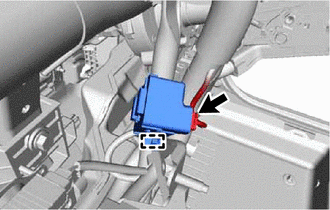
Disengage the clamp.
Disconnect the connector to remove the driving support buzzer (pre-collision city buzzer).
- NOTICE:
-
If the driving support buzzer (pre-collision city buzzer) has been struck or dropped, replace it with a new one.