C1231/31 Steering Angle Sensor Circuit Malfunction
Diagnostic trouble codes · Vehicles built from Jun 2009
Versions by build date: Jun 2006 – Sep 2006 Oct 2006 – May 2009 from Jun 2009
DESCRIPTION
The steering angle sensor signal is sent to the skid control ECU via the CAN communication system. When there is a malfunction in the CAN communication system, it will be detected by the steering angle sensor zero point malfunction diagnostic function.| DTC No. |
DTC Detection Condition |
Trouble Area |
| C1231/31 |
When any of the following is detected:
|
|
WIRING DIAGRAM
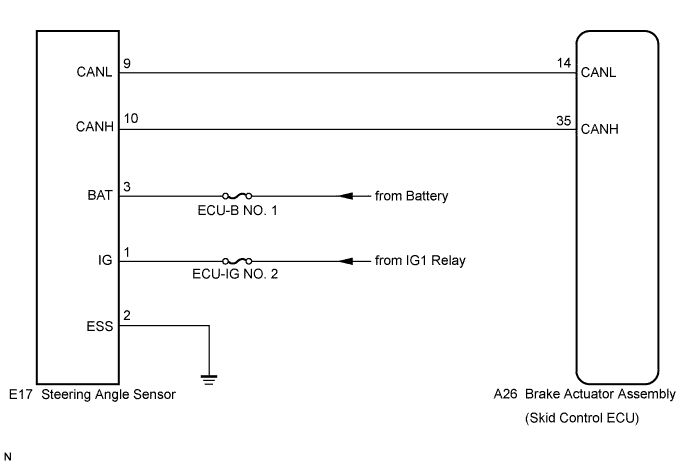

INSPECTION PROCEDURE
- HINT:
- When U0073/94, U0100/63, U0123/62 and/or U0126/63 is output together with C1231/31, inspect and repair the trouble areas indicated by U0073/94, U0100/65, U0123/62 and/or U0126/63 first.
- When the speed sensor or the yaw rate and acceleration sensor has trouble, DTCs for the steering angle sensor may be output even when the steering angle sensor is normal. When DTCs for the speed sensor or yaw rate and acceleration sensor are output together with other DTCs for the steering angle sensor, inspect and repair the speed sensor and yaw rate and acceleration sensor first, and then inspect and repair the steering angle sensor.
- Check the condition of each related circuit connector before troubleshooting (Click here).
- When U0073/94, U0100/63, U0123/62 and/or U0126/63 is output together with C1231/31, inspect and repair the trouble areas indicated by U0073/94, U0100/65, U0123/62 and/or U0126/63 first.
| 1. CHECK DTC |

Clear the DTCs (Click here).
Turn the ignition switch off.
Turn the ignition switch on (IG) again and check that no CAN communication system DTC is output.
Drive the vehicle and turn the steering wheel to the right and left at the speed of 35 km/h (22 mph) and check that no speed sensor and yaw rate and acceleration sensor DTCs are output (Click here).
- Result:
Result
Proceed to
No CAN communication system DTC and the speed sensor or yaw rate and acceleration sensor DTC are output
A
CAN communication system DTC is output
B
Speed sensor or yaw rate and acceleration sensor DTC is output
C
- HINT:
- If there is a malfunction in the speed sensor or the yaw rate and acceleration sensor, an abnormal value may be output although the steering angle sensor is normal.
- If the speed sensor and the yaw rate and acceleration sensor DTCs are output simultaneously, repair the sensors and inspect the steering angle sensor.
- If there is a malfunction in the speed sensor or the yaw rate and acceleration sensor, an abnormal value may be output although the steering angle sensor is normal.
|
|
||||
|
|
||||

| A | |
 |
| 2. INSPECT STEERING ANGLE SENSOR (POWER SOURCE TERMINAL) |
Remove the column cover lower.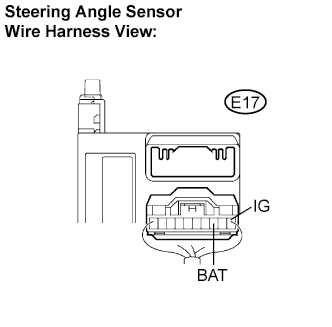
Disconnect the steering angle sensor connector.
Measure the voltage according to the value(s) in the table below.
- Standard voltage:
Tester Connection
Condition
Specified Condition
E17-1 (IG) - Body ground
Ignition switch on (IG)
10 to 14 V
E17-3 (BAT) - Body ground
Always
10 to 14 V
|
|
||||
| OK | |
|
| 3. INSPECT STEERING ANGLE SENSOR (GROUND TERMINAL) |
Measure the resistance according to the value(s) in the table below.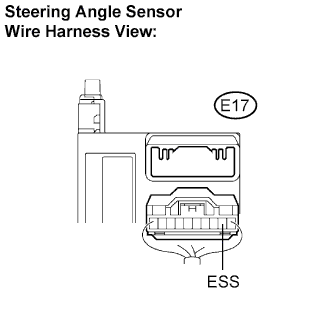
- Standard resistance:
Tester Connection
Condition
Specified Condition
E17-2 (ESS) - Body ground
Always
Below 1 Ω
Connect the connector.
Install the column cover lower.
|
|
||||
| OK | ||
 |
||
| ||