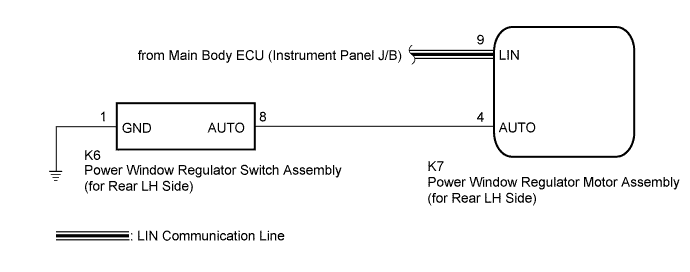
POWER WINDOW CONTROL SYSTEM (for Models with Jam Protection Function on 4 Windows) > Rear Power Window LH Auto Up / Down Function does not Operate with Rear Power Window Switch LH |
| 1.READ VALUE USING INTELLIGENT TESTER (RL-Door Motor) |
Connect the intelligent tester to the DLC3.
Turn the ignition switch to ON.
Turn the intelligent tester on.
Enter the following menus: Body / RL-Door Motor / Data List.
Read the Data List according to the display on the intelligent tester.
| Tester Display | Measurement Item/Range | Normal Condition | Diagnostic Note |
| RL Door P/W Auto SW | Rear LH side power window auto switch signal / ON or OFF | ON: Rear LH power window auto switch operated OFF: Rear LH power window auto switch not operated | - |
|
| ||||
| OK | |
 |
| 2.PERFORM INITIALIZATION (for Rear LH Side) |
Initialize the power window regulator motor assembly (for rear LH side) (Click here).
| NEXT | |
|
| 3.CHECK POWER WINDOW CONTROL SYSTEM (AUTO UP/DOWN FUNCTION) |
Check that the rear LH side door power window moves when the auto up/down function of the power window regulator switch assembly (for rear LH side) is operated (Click here).
|
| ||||
| OK | ||
 | ||
| ||
| 4.INSPECT POWER WINDOW REGULATOR SWITCH ASSEMBLY (for Rear LH Side) |
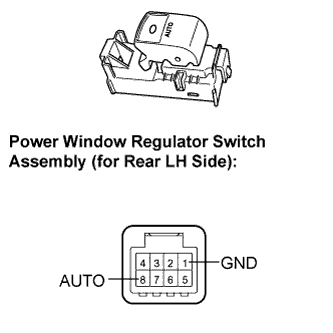 |
Remove the power window regulator switch assembly (for rear LH side) (Click here).
Measure the resistance according to the value(s) in the table below.
| Tester Connection | Switch Condition | Specified Condition |
| 8 (AUTO) - 1 (GND) | Auto up or auto down position | Below 1 Ω |
|
| ||||
| OK | |
|
| 5.CHECK HARNESS AND CONNECTOR (REAR LH SIDE SWITCH - REAR LH SIDE MOTOR) |
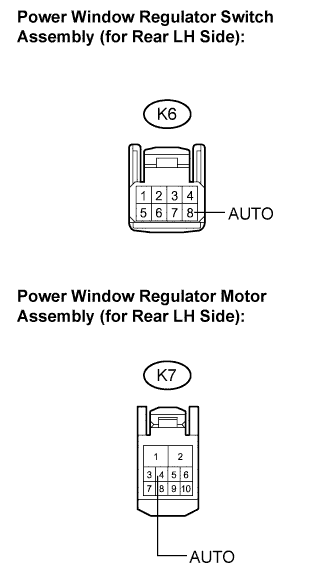 |
Disconnect the power window regulator motor assembly (for rear LH side) connector.
Measure the resistance according to the value(s) in the table below.
| Tester Connection | Condition | Specified Condition |
| K6-8 (AUTO) - K7-4 (AUTO) | Always | Below 1 Ω |
| K6-8 (AUTO) - Body ground | Always | 10 kΩ or higher |
|
| ||||
| OK | ||
| ||
| ||

