AUDIO / VIDEO RADIO ANTENNA CORD REMOVAL
PROCEDURE

 55312
1.REMOVE INSTRUMENT PANEL LOWER
86101
2.REMOVE ANTENNA CORD SUB-ASSEMBLY (for LHD)
for Connector Type Antenna Cord:
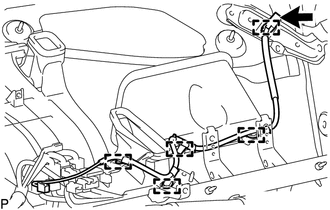
Disconnect the connector.
Disengage the 5 clamps and remove the antenna cord sub-assembly.
for Plug Type Antenna Cord:
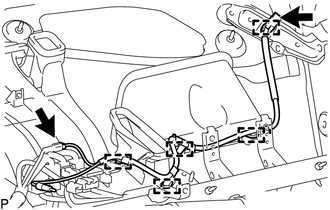
Disconnect the 2 connectors.
Disengage the 5 clamps and remove the antenna cord sub-assembly.
86101
3.REMOVE ANTENNA CORD SUB-ASSEMBLY (for RHD)
for Connector Type Antenna Cord:
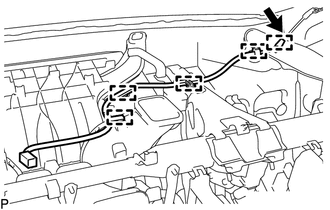
Disconnect the connector.
Disengage the 5 clamps and remove the antenna cord sub-assembly.
for Plug Type Antenna Cord:
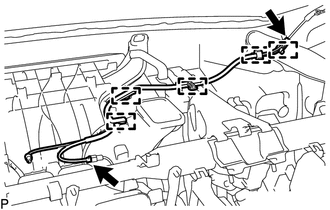
Disconnect the 2 connectors.
Disengage the 5 clamps and remove the antenna cord sub-assembly.
63310
4.REMOVE ROOF HEADLINING ASSEMBLY
86101J
5.REMOVE NO. 2 ANTENNA CORD SUB-ASSEMBLY
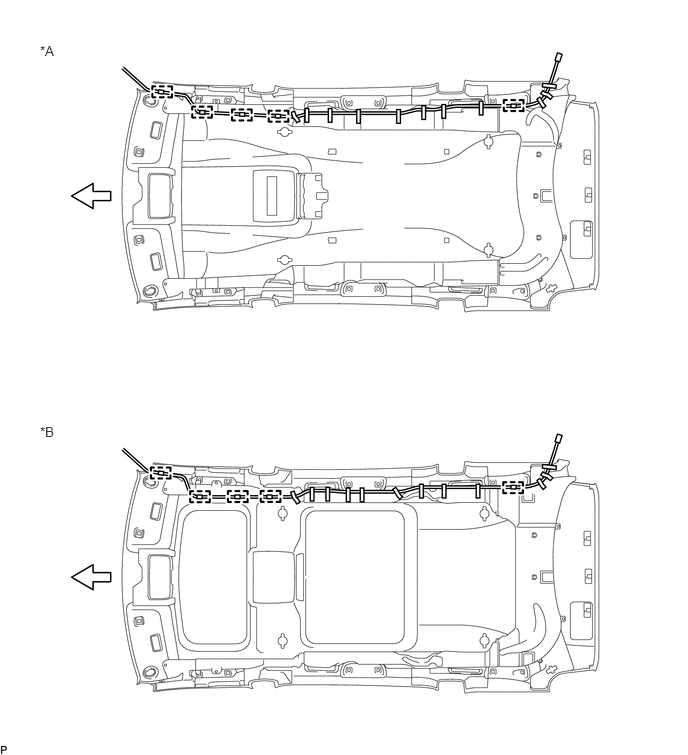
| *A | w/o Sliding Roof | *B | w/ Sliding Roof |

|
Tape | - | - |

|
Front | - | - |
Disengage the 5 clamps.
Remove the tape to the No. 2 antenna cord sub-assembly from the roof headlining assembly.