RM24M0E
_56
Audio / Visual / Telematics
_059566
AUDIO / VIDEO
_0291988
NETWORK GATEWAY ECU
A
AUDIO / VIDEO NETWORK GATEWAY ECU INSTALLATION
PROCEDURE

 89111
1.INSTALL NETWORK GATEWAY ECU
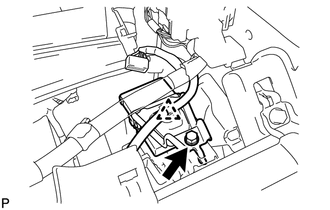
a.
Install the ECU with the bolt.
b.
Attach the clamp.
c.
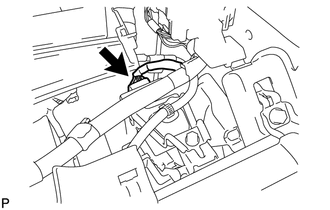
Connect the ECU connector.
55302A
2.INSTALL UPPER INSTRUMENT PANEL SUB-ASSEMBLY
a.
Install the upper instrument panel (see page Vehicle Interior>INTERIOR PANEL>UPPER INSTRUMENT PANEL>INSTALLATION).
3.CONNECT CABLE TO NEGATIVE BATTERY TERMINAL
4.PERFORM INITIALIZATION
a.
Perform initialization (see page General>INTRODUCTION>REPAIR INSTRUCTION>INITIALIZATION).
- NOTICE:
-
Certain systems need to be initialized after disconnecting and reconnecting the cable from the negative (-) battery terminal.