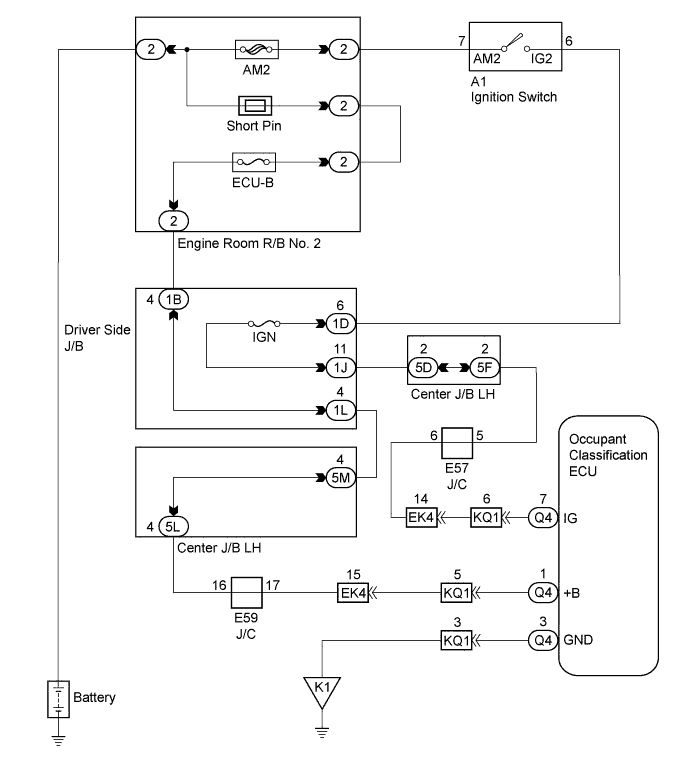
DTC B1794 Open in Occupant Classification ECU Battery Positive Line |
| DTC No. | DTC Detecting Conditions | Trouble Areas |
| B1794 |
|
|
| 1.CHECK DTC |
Turn the ignition switch to the on position.
Clear the DTCs stored in the memory (Click here).
Turn the ignition switch to the lock position, and wait for at least 10 seconds.
Turn the ignition switch to the on position.
Check the DTCs (Click here).
|
| ||||
| NG | |
 |
| 2.CHECK CONNECTION OF CONNECTORS |
Turn the ignition switch to the lock position.
Disconnect the negative (-) terminal cable from the battery, and wait for at least 90 seconds.
Check that the connectors are properly connected to the occupant classification ECU.
|
| ||||
| OK | |
|
| 3.CHECK WIRE HARNESS (SOURCE VOLTAGE) |
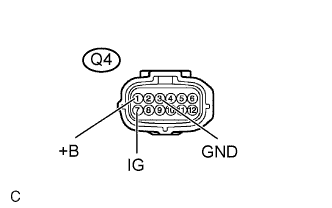 |
Turn the ignition switch to the lock position.
Disconnect the negative (-) terminal cable from the battery, and wait for at least 90 seconds.
Disconnect the Q4 connector from the occupant classification ECU.
Connect the negative (-) terminal cable to the battery.
Measure the voltage.
| Tester Connection | Condition | Specified Condition |
| Q4-1 (+B) - Body ground | Always | 11 to 14 V |
| Q4-7 (IG) - Body ground | Ignition switch on | 11 to 14 V |
Measure the resistance.
| Tester Connection | Condition | Specified Condition |
| Q4-3 (GND) - Body ground | Always | Below 1 Ω |
|
| ||||
| OK | |
|
| 4.CHECK DTC |
Turn the ignition switch to the lock position.
Disconnect the negative (-) terminal cable from the battery, and wait for at least 90 seconds.
Connect the connectors to the occupant classification ECU.
Connect the negative (-) terminal cable to the battery.
Turn the ignition switch to the on position.
Clear any DTCs stored in the memory (Click here).
Turn the ignition switch to the lock position, and wait for at least 10 seconds.
Turn the ignition switch to the on position.
Using a Techstream, check for DTCs of the occupant classification ECU (Click here).
|
| ||||
| NG | |
|
| 5.REPLACE OCCUPANT CLASSIFICATION ECU |
Turn the ignition switch to the lock position.
Disconnect the negative (-) terminal cable from the battery, and wait for at least 90 seconds.
Replace the occupant classification ECU (Click here).
| NEXT | |
|
| 6.PERFORM ZERO POINT CALIBRATION |
Connect the negative (-) terminal cable to the battery.
Connect a Techstream to the DLC3.
Turn the ignition switch to the on position.
Using the Techstream, perform the zero point calibration (Click here).
| NEXT | |
|
| 7.PERFORM SENSITIVITY CHECK |
Using a Techstream, perform the sensitivity check (Click here).
Confirm that nothing is placed on the passenger seat.
Confirm that the beginning sensor reading is within the standard range.
Place a 30 kg (66.14 lb) weight (e.g. a lead mass) onto the front passenger seat.
Confirm that the sensitivity is within the standard range.
| NEXT | ||
 | ||
| ||
