SUPPLEMENTAL RESTRAINT SYSTEMS SIDE AIRBAG SENSOR(for Rear Pillar) INSTALLATION
CAUTION / NOTICE / HINT
- HINT:
- ·
Use the same procedure for RHD and LHD vehicles.
·The procedure listed below is for LHD vehicles.
·Use the same procedure for the RH and LH sides.
·The procedure listed below is for the LH side.
PROCEDURE

 89831C
1.INSTALL NO. 2 SIDE AIRBAG SENSOR
Check that the ignition switch is off.
Check that the cable is disconnected from the negative (-) battery terminal.
- CAUTION:
- ·
Wait at least 90 seconds after disconnecting the cable from the negative (-) battery terminal to disable the SRS system.
·If the airbag deploys for any reason, it may cause a serious accident.
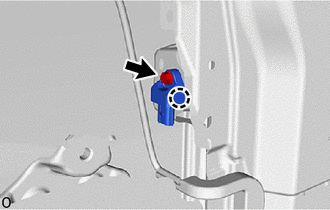
Attach the claw and hold the No. 2 side airbag sensor in place.
- NOTICE:
- ·
If the No. 2 side airbag sensor has been dropped, replace it with a new one.
·When installing the No. 2 side airbag sensor, be careful that the SRS wiring does not interfere with or is not pinched between other parts.
Install the bolt.
- Torque:
- 9.0 N*m (92 kgf*cm, 80 in.*lbf)
- NOTICE:
-
Tighten the bolt while holding the No. 2 side airbag sensor because the No. 2 side airbag sensor claw is easily damaged.
Check that there is no looseness in the installation parts of the No. 2 side airbag sensor.
Connect the airbag connector.
- NOTICE:
-
When connecting any airbag connector, take care not to damage the airbag wire harness.
- HINT:
-
Refer to How to Connect or Disconnect Airbag Connector: Click hereVehicle Interior>SUPPLEMENTAL RESTRAINT SYSTEMS>AIRBAG SYSTEM (for Type B)>HOW TO CONNECT OR DISCONNECT AIRBAG CONNECTOR
62632D
2.INSTALL REAR QUARTER TRIM BOARD LH
73370E
3.INSTALL REAR SEAT OUTER BELT ASSEMBLY LH
4.CONNECT CABLE TO NEGATIVE BATTERY TERMINAL
5. INITIALIZATION AFTER RECONNECTING BATTERY TERMINAL
Click hereGeneral>SETUP>WHEN DISCONNECTING OR RECONNECTING BATTERY TERMINAL>WORK PROCEDURE
- HINT:
-
When disconnecting and reconnecting the battery, there is an automatic learning function that completes learning when the respective system is used.
-
Click hereGeneral>SETUP>WHEN DISCONNECTING OR RECONNECTING BATTERY TERMINAL>AUTOMATIC LEARNING CHART
6.PERFORM DIAGNOSTIC SYSTEM CHECK
7.CHECK SRS WARNING LIGHT
8.PERFORM SYSTEM INITIALIZATION AND CALIBRATION