TELEMATICS ANTENNA DIVIDER INSTALLATION
PROCEDURE

 86681C
1.INSTALL ANTENNA DIVIDER
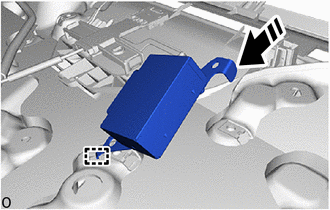

|
Install in this Direction |
Attach the guide as shown in the illustration.
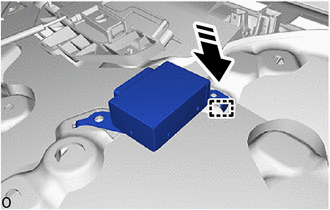
|
|
Install in this Direction |
Attach the guide to set the antenna divider as shown in the illustration.
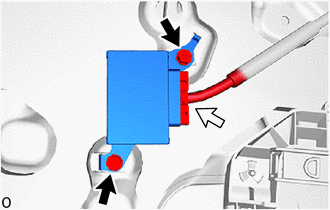

|
Screw |

|
Connector |
Install the antenna divider with the 2 screws.
Connect the connector.
55990C
2.INSTALL CENTER DEFROSTER NOZZLE ASSEMBLY
3.INSTALL INSTRUMENT PANEL SAFETY PAD
4.CONNECT CABLE TO NEGATIVE BATTERY TERMINAL
for 7GR-FKS:
for 1GD-FTV:
5. INITIALIZATION AFTER RECONNECTING BATTERY TERMINAL
Click hereGeneral>SETUP>WHEN DISCONNECTING OR RECONNECTING BATTERY TERMINAL>WORK PROCEDURE
- HINT:
-
When disconnecting and reconnecting the battery, there is an automatic learning function that completes learning when the respective system is used.
-
Click hereGeneral>SETUP>WHEN DISCONNECTING OR RECONNECTING BATTERY TERMINAL>AUTOMATIC LEARNING CHART
6. PERFORM DIAGNOSTIC SYSTEM CHECK
7.CHECK SRS WARNING LIGHT